| Type: | Package |
| Title: | Multiple Checks on MEDITS Trawl Survey Data |
| Version: | 0.2.4 |
| Description: | Provides quality checks for MEDITS (International Bottom Trawl Survey in the Mediterranean) trawl survey exchange data tables (TA (Haul data), TB (Catch data), TC (Biological data), TE (Biological individual data), TL (Litter data)). The main function RoME() calls all check functions in a defined sequence to perform a complete quality control of TX (Generic exchange data) data, including header validation, controlled-vocabulary checks, cross-table consistency tests, and biological plausibility checks. No automatic correction is applied: the package detects errors, warns the user, and specifies the type of error to ease data correction. Checks can be run simultaneously on multi-year datasets. An embedded 'shiny' application is also provided via run_RoME_app(). References describing the methods: MEDITS Working Group (2017). |
| Depends: | R (≥ 4.0) |
| License: | GPL-3 |
| Encoding: | UTF-8 |
| Language: | en-US |
| LazyData: | true |
| Imports: | timeDate, stringr, ggplot2, rnaturalearth, rnaturalearthdata, zip, maps, sp, dplyr, ggrepel, magrittr, geosphere, shiny |
| Suggests: | knitr, rmarkdown, svDialogs, shinyjs |
| VignetteBuilder: | knitr |
| RoxygenNote: | 7.3.3 |
| NeedsCompilation: | no |
| Packaged: | 2026-07-23 12:50:36 UTC; Walter |
| Author: | Walter Zupa [aut, cre], Isabella Bitetto [aut], Maria Teresa Spedicato [aut], Loredana Casciaro [rev], Cosmidano Neglia [rev] |
| Maintainer: | Walter Zupa <zupa@fondazionecoispa.org> |
| Repository: | CRAN |
| Date/Publication: | 2026-07-23 13:10:07 UTC |
Length and weight ranges for relevant species
Description
Data frame containing information about length and individual weight ranges for relevant species, including quantiles and various statistics. It also contains metadata about faunistic category and period of relevance as target species.
Usage
data("DataTargetSpecies")
Format
A data frame with 392 observations on the following 26 variables:
SPECIESRubincode species identifier (character).
WMINMinimum observed individual weight (numeric).
WMIN055th percentile of individual weight (numeric).
WMIN1010th percentile of individual weight (numeric).
WMIN2525th percentile of individual weight (numeric).
WMAX_7575th percentile of individual weight (numeric).
WMAX9090th percentile of individual weight (numeric).
WMAX9595th percentile of individual weight (numeric).
WMAXMaximum observed individual weight (numeric).
LMINMinimum observed length (numeric, in mm).
LMIN011st percentile of length (numeric, in mm).
LMIN055th percentile of length (numeric, in mm).
LMIN1010th percentile of length (numeric, in mm).
LMIN2525th percentile of length (numeric, in mm).
LMAX7575th percentile of length (numeric, in mm).
LMAN9090th percentile of length calculated via mean or other method (numeric, in mm).
LMAX9595th percentile of length (numeric, in mm).
LMAX9999th percentile of length (numeric, in mm).
LMAXMaximum observed length (numeric, in mm).
obs_in_TCNumber of observations found in TC data (numeric).
FAUNISTIC_CATEGORYOld faunistic categories (character).
START_YEARYear when the species started to be considered target (numeric).
END_YEARYear when the species stopped being considered target (numeric).
GROUPSpecies group or classification (character).
Author(s)
W. Zupa
Source
Literature and other data sources.
Examples
data(DataTargetSpecies)
head(DataTargetSpecies)
List of GFCM Geographical subareas (GSAs)
Description
GSAs table
Usage
data("GSAs")Format
A data frame with 31 observations on the following 3 variables.
GSAa numeric vector
CODEa character vector
Areaa character vector
Author(s)
W. Zupa
Source
https://www.fao.org/gfcm/data/maps/gsas/en/
References
https://www.fao.org/gfcm/data/maps/gsas/en/
Examples
data(GSAs)
str(GSAs)
head(GSAs)
Table of the Length-Weight parameters
Description
Table of the length-weight relationship coefficients reported by species, area and sex.
Usage
data("LW")Format
A data frame with 460 observations on the following 5 variables.
AREAvector of the reference geographic area
SPECIESreference species for the a and b parameters
SEXreference sex for the a and b parameters
aa parameters of the length-weight relationship function
bb parameters of the length-weight relationship function
Details
Table of the length-weight relationship coefficients a and b.
Author(s)
W. Zupa
Examples
data(LW)
str(LW)
Conversion of MEDITS format coordinates in decimal degrees format
Description
Conversion of MEDITS format coordinates in decimal degrees format
Usage
MEDITS.to.dd(data)Arguments
data |
data frame of the hauls data (TA, table A) in MEDITS format |
Value
The function returns the data frame of the TA table with the coordinates expressed as decimal degrees.
Author(s)
Walter Zupa
Examples
MEDITS.to.dd(TA)Maturity parameters
Description
Maturity parameters used for the checks: check_smallest_mature, check_spawning_period and check_sex_inversion
Usage
data("Maturity_parameters")Format
A data frame with 64 observations on the following 12 variables.
Speciesa factor with levels the rubincodes of the species for which the information is known.
SEXa factor with levels
CFMmin_L50a numeric vector
max_L50a numeric vector
smallest_mature_individual_observeda numeric vector
min_length_SEX_INVERSIONa numeric vector
max_length_SEX_INVERSIONa numeric vector
Type_of_hermaphroditisma factor with levels
proterandrousprotogynousAreaa factor with levels as the area of the relevant information
Start_reproductive_seasona numeric vector
End_reproductive_seasona numeric vector
Referencea factor with levels of the bibliographic references
Author(s)
W. Zupa
Source
Literature and others
Examples
data(Maturity_parameters)
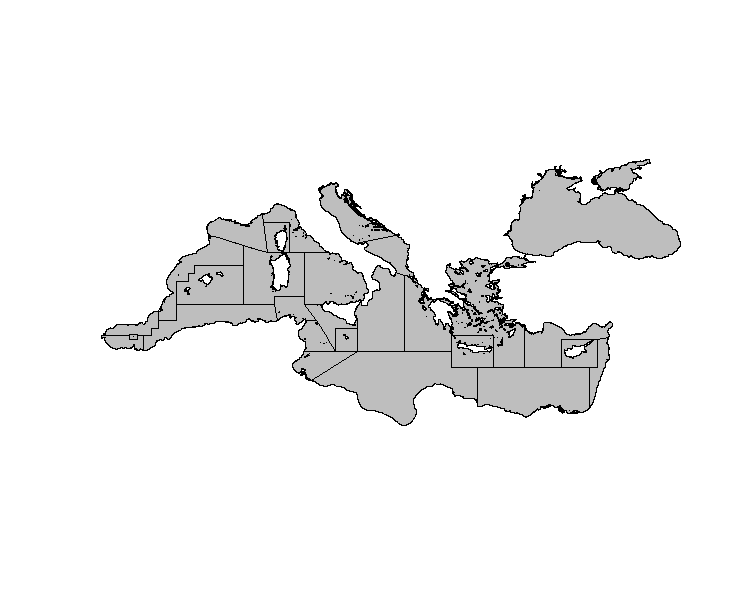
Shapefile of Mediterranean and Black Sea area
Description
Polygon shapefile describing the GFCM's Geographical subareas (GSAs)
Usage
data("MedSea")Format
The shapefile is derived from the GFCM's Geographical subareas (GSAs) shapefile
Details
Polygon shapefile describing the GFCM's Geographical subareas (GSAs) compressed with the xz type of compression.
Author(s)
W. Zupa
Source
https://www.fao.org/fileadmin/user_upload/faoweb/GFCM/Maps/GSAs_simplified.zip
References
https://www.fao.org/gfcm/data/maps/gsas/en/
Examples
  library(sp)
  data(MedSea)
  plot(MedSea)
Function to concatenate the R-sufi files of the different years.
Description
When the check procedure is completed for a number of years, it is possible to obtain the 4 R-Sufi global files from an year to another year.
Usage
RSufi_files(Year_start,Year_end,AREA,wd)
Arguments
Year_start |
Start year |
Year_end |
Start end |
AREA |
String of the GSA. Include only the number. |
wd |
working directory path defined by the user |
Value
The function saves automatically in the files R-Sufi folder the 4 global files, with suffix of the year range and GSA.
Author(s)
I. Bitetto, W. Zupa
References
Rochet M. J., V. M. Trenkel, J. A. Bertrand & J.-C. Poulard, 2004. R routines for survey based fisheries population and community indicators (R-SUFI). Ifremer, Nantes. Limited distribution. Anonymus. 2017. MEDITS-Handbook. Version n. 9. MEDITS Working Group. 106 pp.
Examples
TA = RoME::TA
TB = RoME::TB
TC = RoME::TC
DataSpecies=RoME::TM_list
Stratification=RoME::stratification_scheme
year = 2012
wd <- tempdir()
create_haul(TA,year,wd,save=TRUE)
create_catch(TB,year,wd,save=TRUE)
create_length(TC,year,DataSpecies,wd,save=TRUE)
create_strata(Stratification,"10",wd,save=TRUE)
RSufi_files(2012,2012,"10",wd) # run only if you are working outside a temporary directory
Multiple Checks on MEDITS Trawl Survey Data
Description
The function calls all the functions built in the package in an ordered way to perform a complete quality check of TX data available. The check is performed simultaneously on the files that can contain also data of more than one year.
Usage
RoME(TA,TB,TC,TE=NA,TL=NA,wd,suffix=NA,
create_RSufi_files = FALSE, create_global_RSufi_files=FALSE,
Year_start=NA,Year_end=NA,verbose =TRUE,Stratification=RoME::stratification_scheme,
Ref_list=RoME::TM_list,DataTargetSpecies=RoME::DataTargetSpecies,
Maturity=RoME::Maturity_parameters,
ab_parameters=RoME::LW,
stages_list=RoME::mat_stages,assTL=assTL)
Arguments
TA |
Haul data table according to MEDITS protocol (TA) |
TB |
Catch data table according to MEDITS protocol (TB) |
TC |
Biological data table according to MEDITS protocol (TC) |
TE |
Individual biological data table according to MEDITS protocol (TE) if available, if TE data are not available, use NA. |
TL |
Litter data table according to MEDITS protocol (TL) if available, if TL data are not available, use NA |
wd |
working directory path defined by the user |
suffix |
Suffix string of the Logfile, in case it |
create_RSufi_files |
boolean variables used to choose if create R-sufi files. The files are saved in the R-sufi directory and named with a suffix of the year and GSA |
create_global_RSufi_files |
boolean variables used to choose if global R-sufi files should be created from an year to another year |
Year_start |
numeric value indicating the starting year for the production of R-sufi file. This parameter must to be reported in case |
Year_end |
numeric value indicating the ending year for the production of R-sufi files |
verbose |
... |
Stratification |
Stratification scheme according to MEDITS protocol. |
Ref_list |
TM_list reference list |
DataTargetSpecies |
Information related to target species. |
Maturity |
Information related to sex and maturity from literature or other sources. |
ab_parameters |
dataframe containing the a and b parameters of the length-weight relationships |
stages_list |
Table of maturity stages. |
assTL |
data frame with the association between TL (litter table) categories and sub-categories |
Details
RoME checks can be used to integrate a list of common quality checks on survey data. This function calls all the functions built in the package in an ordered way to perform a complete quality check of TX data available. The order of the checks in RoME was implemented in a defined sequence to avoid cascade errors due to the correction of a previous error. No automatic correction is implemented in 'RoME'. 'RoME' stops if an error occurs; then the user has to correct the error and run again the code to continue with the other checks. The function runs on a complete time series dataset, checking year after year, until the end of the time series. After the checks of the mandatory fields and the controlled vocabulary, that are carried out for all the TX tables, the specific checks on each kind of TX table are performed. Finally, RoME provides a list of cross checks aimed to guarantee the consistency among the data tables.
Some functions included in the 'RoME' library and used by RoME function need specific dictionaries or tables. It is the case of Stratification, Ref_list, DataTargetSpecies, Maturity_parameters, mat_stages and assTL tables. All of them are provided by default in this library. Anyway, the user has the possibility to provide ad hoc modified versions of these tables adapting the checks to specific needs.
Value
The function does not correct data, but it detects the errors, warning the user that there is the possibility of one or more errors, specifying the type of the error and easing the data correction. If parameter verbose=TRUE returns a series of text output in console to let the user to trace the state of the checks. All the output of the functions are stored in the user defined working directory wd and in the sub-directory there resident. In the Lofile subfolder are stored the logfiles of each run of the function.
Author(s)
I. Bitetto, W. Zupa
References
Anonymus. 2017. MEDITS-Handbook. Version n. 9. MEDITS Working Group. 106 pp.
Examples
wd <- tempdir()
suffix=NA
DataTA = RoME::TA
DataTB = RoME::TB
DataTC = RoME::TC
DataTE = NA
DataTL = NA
RoME(DataTA, DataTB,DataTC,DataTE,DataTL, wd, suffix,
  Stratification=RoME::stratification_scheme,
  Ref_list=RoME::TM_list,DataTargetSpecies=RoME::DataTargetSpecies,
  Maturity=RoME::Maturity_parameters,ab_parameters=RoME::LW,
  stages_list=RoME::mat_stages,assTL=RoME::assTL)
Continuous Quality Checks on Black Sea trawl Survey Data
Description
The function RoMEBScc performs a full suite of automated, non-stopping quality checks on survey data for the Black Sea. It invokes the same sequence of validation routines as RoMEcc (for TA, TB, TC, TE and TL tables) but uses tables and parameters tailored to Black Sea strata, species and maturity references.
Usage
RoMEBScc(
  TA,
  TB,
  TC,
  TE = NA,
  TL = NA,
  wd,
  suffix = NA,
  verbose = TRUE,
  Stratification = RoME::stratification_scheme,
  Ref_list = RoME::TM_list,
  DataTargetSpecies = RoME::DataTargetSpecies,
  Maturity = RoME::Maturity_parameters,
  ab_parameters = RoME::LW,
  stages_list = RoME::mat_stages,
  assTL = RoME::assTL,
  zip = TRUE
)
Arguments
TA |
Haul metadata table (TA) |
TB |
Catch data table (TB) |
TC |
Biological data table (TC) |
TE |
Individual biological data table (TE), or |
TL |
Litter table (TL), or |
wd |
Working directory path where "Logfiles" and "Graphs" subfolders are written. |
suffix |
Character suffix for output filenames. If |
verbose |
Logical; if |
Stratification |
Stratification scheme object; defaults to |
Ref_list |
Reference list for tow metadata; defaults to |
DataTargetSpecies |
Species-specific reference dataset; defaults to |
Maturity |
Maturity-parameter table; defaults to |
ab_parameters |
Length-weight parameter table; defaults to |
stages_list |
Maturity-stage lookup table; defaults to |
assTL |
Category-subcategory mapping for TL; defaults to |
zip |
Logical; if |
Details
RoMEBScc checks can be used to integrate a list of common quality checks on survey datafrom Black Sea. This function calls all the functions built in the package in an ordered way to perform a complete quality check of TX data available. The order of the checks in RoME was implemented in a defined sequence to avoid cascade errors due to the correction of a previous error. No automatic correction is implemented in 'RoME'. 'RoME' stops if an error occurs; then the user has to correct the error and run again the code to continue with the other checks. The function runs on a complete time series dataset, checking year after year, until the end of the time series. After the checks of the mandatory fields and the controlled vocabulary, that are carried out for all the TX tables, the specific checks on each kind of TX table are performed. Finally, RoME provides a list of cross checks aimed to guarantee the consistency among the data tables.
Some functions included in the 'RoME' library and used by RoME function need specific dictionaries or tables. It is the case of Stratification, TM_list, DataTargetSpecies, Maturity_parameters, mat_stages and assTL tables. All of them are provided by default in this library. Anyway, the user has the possibility to provide ad hoc modified versions of these tables adapting the checks to specific needs.
Value
The function does not correct data, but it detects the errors, warning the user that there is the possibility of one or more errors, specifying the type of the error and easing the data correction. If parameter verbose=TRUE returns a series of text output in console to let the user to trace the state of the checks. All the output of the functions are stored in the user defined working directory wd and in the sub-directory there resident. In the Lofile subfolder are stored the logfiles of each run of the function.
Author(s)
W. Zupa
References
Anonymus. 2017. MEDITS-Handbook. Version n. 9. MEDITS Working Group. 106 pp.
Examples
wd <- tempdir()
# Example using TA, TB, TC slices for 2018
TA_sub <- RoME::TA[RoME::TA$YEAR == 2018, ]
TB_sub <- RoME::TB[RoME::TB$YEAR == 2018, ]
TC_sub <- RoME::TC[RoME::TC$YEAR == 2018, ]
# TE/TL not used in this example
RoMEBScc(
  TA_sub, TB_sub, TC_sub, TE = NA, TL = NA,
  wd = wd, suffix = "BS_test",
  verbose = FALSE
)
Continuous Quality Checks on MEDITS Trawl Survey Data
Description
The function calls all the functions included in the package in an ordered way to perform a complete quality check of TX data available. The check is performed simultaneously on the files that can contain also data of more than one year. Unlike the RoME function, RoMEcc does not stop at the first detected error, allowing user to correct data. Instead, it checks all the data and returns a report on the errors found, as well as compiling a detailed log file.
Usage
RoMEcc(TA,TB,TC,TE=NA,TL=NA,wd,suffix=NA,
verbose =TRUE,Stratification=RoME::stratification_scheme,
Ref_list=RoME::TM_list,DataTargetSpecies=RoME::DataTargetSpecies,
Maturity=RoME::Maturity_parameters,
ab_parameters=RoME::LW,
stages_list=RoME::mat_stages,assTL=RoME::assTL, zip=TRUE)
Arguments
TA |
Haul data table according to MEDITS protocol (TA) |
TB |
Catch data table according to MEDITS protocol (TB) |
TC |
Biological data table according to MEDITS protocol (TC) |
TE |
Individual biological data table according to MEDITS protocol (TE) if available, if TE data are not available, use NA. |
TL |
Litter data table according to MEDITS protocol (TL) if available, if TL data are not available, use NA |
wd |
working directory path defined by the user |
suffix |
Suffix string of the Logfile, in case it |
verbose |
... |
Stratification |
Stratification scheme according to MEDITS protocol. |
Ref_list |
TM_list reference list |
DataTargetSpecies |
Information related to target species. |
Maturity |
Information related to sex and maturity from literature or other sources. |
ab_parameters |
dataframe containing the a and b parameters of the length-weight relationships |
stages_list |
Table of maturity stages. |
assTL |
data frame with the association between TL (litter table) categories and sub-categories |
zip |
boolean, if TRUE a zip file containing the results is generated |
Details
RoMEcc checks can be used to integrate a list of common quality checks on survey data. This function calls all the functions built in the package in an ordered way to perform a complete quality check of TX data available. The order of the checks in RoME was implemented in a defined sequence to avoid cascade errors due to the correction of a previous error. No automatic correction is implemented in 'RoME'. 'RoME' stops if an error occurs; then the user has to correct the error and run again the code to continue with the other checks. The function runs on a complete time series dataset, checking year after year, until the end of the time series. After the checks of the mandatory fields and the controlled vocabulary, that are carried out for all the TX tables, the specific checks on each kind of TX table are performed. Finally, RoME provides a list of cross checks aimed to guarantee the consistency among the data tables.
Some functions included in the 'RoME' library and used by RoME function need specific dictionaries or tables. It is the case of Stratification, TM_list, DataTargetSpecies, Maturity_parameters, mat_stages and assTL tables. All of them are provided by default in this library. Anyway, the user has the possibility to provide ad hoc modified versions of these tables adapting the checks to specific needs.
Value
The function does not correct data, but it detects the errors, warning the user that there is the possibility of one or more errors, specifying the type of the error and easing the data correction. If parameter verbose=TRUE returns a series of text output in console to let the user to trace the state of the checks. All the output of the functions are stored in the user defined working directory wd and in the sub-directory there resident. In the Lofile subfolder are stored the logfiles of each run of the function.
Author(s)
W. Zupa,I. Bitetto
References
Anonymus. 2017. MEDITS-Handbook. Version n. 9. MEDITS Working Group. 106 pp.
Examples
wd <- tempdir()
suffix=NA
DataTA = data.frame(RoME::TA[RoME::TA$YEAR==2012 ,])
DataTB = data.frame(RoME::TB[RoME::TB$YEAR==2012 ,])
DataTC = data.frame(RoME::TC[RoME::TC$YEAR==2012 ,])
DataTE = NA
DataTL = NA
RoMEcc(DataTA, DataTB,DataTC,DataTE,DataTL, wd, suffix,
  Stratification=RoME::stratification_scheme,
  Ref_list=RoME::TM_list,DataTargetSpecies=RoME::DataTargetSpecies,
  Maturity=RoME::Maturity_parameters,ab_parameters=RoME::LW,
  stages_list=RoME::mat_stages,assTL=RoME::assTL, verbose=FALSE)
TA
Description
TA table
Author(s)
W. Zupa
TB
Description
TB table
Author(s)
W. Zupa
TC
Description
TC table
Author(s)
W. Zupa
TE
Description
TE table
Author(s)
W. Zupa
TL
Description
TL table
Author(s)
W. Zupa
TM list
Description
The present list is destined to code the marine species encountered in the Mediterranean. It has been built following the principle used in the Nordic Code Centre (Stockholm). For most of the species the codes are identical to those proposed by the NCC. However some species can be coded differently. In addition numerous Mediterranean species are not included in the NCC code and have been added. So the present list is specific. It has to be referred as the TM list (Taxonomic list not only Faunistic, FM list).
Usage
data("TM_list")Format
A data frame with 1470 observations on the following 11 variables.
N.a numeric vector
MeditsCodea factor with levels of species codes in the RUBIN format (see MEDITS manual)
Scientific.Name.................................................valida factor with levels of the scientific names of the species
Authorshipa factor with levels of the authorship of the information
Sourcea factor with levels sources of the information
Referencea factor with levels of the bibliographic references
Remarksa factor with levels the reported remarks
CATFAUa factor with levels of the faunistic categories of the species
CODLONa factor with CODLON that represents the Length classes code: m = 1 mm; 0 = 0,5 cm; 1 = 1 cm.
GSAsa factor with levels of the Geographic Sub-Areas (GSA) adopted in the MEDITS protocol.
Yeara factor with levels of the years
Author(s)
W. Zupa
Source
MEDITS MEDITS-Handbook, Version n. 9 (2017)
References
Anonymus. 2017. MEDITS-Handbook. Version n. 9. MEDITS Working Group. 106 pp.
Examples
data(TM_list)
str(TM_list)
head(TM_list)
TL association between categories and sub-categories
Description
List of the allowed association between categories and subcategories in litter data table (TL)
Usage
data("assTL")Format
A data frame with 42 observations on the following 2 variables.
LITTER_CATEGORYList of litter categories
- ‘LITTER_SUB-CATEGORY’
List of litter sub-categories
Details
The table is used to check the correctness of the categories/sub-categories associations in litter data tables (TL).
Author(s)
W. Zupa
Source
Anonymus (2017) "MEDITS-Handbook. Version n. 9. MEDITS Working Group"
References
Anonymus (2017) "MEDITS-Handbook. Version n. 9. MEDITS Working Group"
Examples
data(assTL)
str(assTL)
Function to check the correctness of the headers.
Description
Function to check the correctness of the headers for haul data (TA), catch data (TB), biological data (TC), individual data (TE), litter data (TL) tables.
Usage
checkHeader(dataframe, template,wd,suffix)Arguments
dataframe |
Table to check |
template |
Template used for the check. |
wd |
working directory path defined by the user |
suffix |
Suffix string of the Logfile |
Details
This function produce an error, stopping the check procedure to avoid cascade errors.
Value
The function returns TRUE if no error occurs, while FALSE is returned when there is more than one valid hauls. In the logfile and in the console is reported the list of all the records in which the inconsistency is detected.
Author(s)
I. Bitetto, W. Zupa
References
Anonymus. 2017. MEDITS-Handbook. Version n. 9. MEDITS Working Group. 106 pp.
Examples
wd=tempdir()
suffix= "2020-03-05_time_h17m44s55"
checkHeader(RoME::TA,"TA",wd,suffix)
checkHeader(RoME::TB,"TB",wd,suffix)
checkHeader(RoME::TC,"TC",wd,suffix)
Checks the presence of 0 fields in TA
Description
The function checks the presence of 0 fields in the following haul data table (TA, according to MEDITS protocol) fields: WING_OPENING, WARP_DIAMETER and VERTICAL_OPENING
Usage
check_0_fieldsTA(DataTA,wd,suffix,year)Arguments
DataTA |
Haul data table according to MEDITS protocol (TA) |
wd |
working directory path defined by the user |
suffix |
Suffix string of the Logfile |
year |
reference year for the analysis |
Value
The function returns a boolean value. It is FALSE in case 0 values are detected in the TA table's fields
Author(s)
Isabella Bitetto [aut,cre] <bitetto@coispa.it>; Walter Zupa [aut, cre] <zupa@coispa.it>
References
Anonymus (2017) "MEDITS-Handbook. Version n. 9. MEDITS Working Group"
Examples
wd <- tempdir()
suffix="2020-03-05_time_h17m44s55"
check_0_fieldsTA(RoME::TA,wd,suffix, year=2007)
Check of length measurements for G1 and G2 species
Description
Check if for G1 and G2 species the length measurements are present in TC
Usage
check_G1_G2(DataTC, year, wd, suffix)Arguments
DataTC |
Biological data table according to MEDITS protocol (TC) |
year |
reference year for the analysis |
wd |
working directory path defined by the user |
suffix |
Suffix string of the Logfile |
Details
This check uses a new support table (list_g1_g2) containing the list of MEDITS G1 and G2 species and verify if the length has been collected for the selected species for each haul. If the length is lacking for any species in any haul, a warning message is given in the logfile.
Value
The function returns always TRUE because the outcome of the function is a warning that does not block the execution of the 'RoME' checks. If the length is lacking for any species in any haul, a warning message is given in the logfile.
Author(s)
I. Bitetto, W. Zupa
References
Anonymus. 2017. MEDITS-Handbook. Version n. 9. MEDITS Working Group. 106 pp.
Examples
wd <- tempdir()
suffix="2020-03-05_time_h17m44s55"
check_G1_G2(RoME::TC,year=2007,wd,suffix)
Function to verify the consistency between individual data table (TE) and biological data table (TC) respect to number of individuals.
Description
Check if the individuals by species, length, sex and maturity stage reported in TE are less than the number reported in TC
Usage
check_TE_TC(ResultDataTC,ResultDataTE,year,wd,suffix)
Arguments
ResultDataTC |
Biological data table(TC). |
ResultDataTE |
Individual data table (TE). |
year |
reference year for the analysis. |
wd |
Working directory selected by the user. |
suffix |
Suffix string of the Logfile. |
Details
This function gives an error message, thus the execution is stopped if in TE are reported individuals not present in TC and if the number of individuals reported in TE is greater than the ones in TE; the user is informed in the Logfile.
Value
The function returns TRUE if there is no error, while FALSE if there is one or more errors.The run, in case of error, thus, is stopped.
Author(s)
I. Bitetto, W. Zupa
References
Anonymus. 2017. MEDITS-Handbook. Version n. 9. MEDITS Working Group. 106 pp.
Examples
wd=tempdir()
suffix= "2020-03-05_time_h17m44s55"
tc <- RoME::TC
te <- RoME::TE
year=2012
check_TE_TC(tc,te,year,wd,suffix)
Box-plots of swept-area-standardised abundance indices
Description
This function reads matching MEDITS TA (haul metadata) and
TB (catch numbers) tables for a single survey year, computes the swept
area for each haul, derives haul-level abundance indices expressed as
individuals per km^2, and produces one or more box-plots that summarise the
distribution of those indices by species. The plots are written to the folder
‘<wd>/Graphs/Abundance/’ and a logfile is produced under
‘<wd>/Logfiles/’ with a summary of any quality-control issues
encountered.
Usage
check_abundance(ResultDataTA, ResultDataTB, year, wd,
suffix = NULL, distance_unit = "km", min_hauls = 5L)
Arguments
ResultDataTA |
Data frame containing at least the columns |
ResultDataTB |
Data frame containing at least |
year |
Single numeric value identifying the survey year to analyse. |
wd |
Writable directory where the function will place ‘Logfiles/’ and ‘Graphs/Abundance/’. |
suffix |
Optional text appended to the logfile name. When missing a timestamp is used. |
distance_unit |
Either |
min_hauls |
Minimum number of valid hauls a species must appear in to be
plotted. Defaults to |
Details
A swept area is first computed for every haul from TA. The function
then merges TA and TB. Hauls that lack swept area information
or hauls whose total number of individuals is missing (or equal to zero when
not allowed by the faunistic category) are discarded and reported in the
logfile. Species occurring in fewer than min_hauls valid hauls are also
removed. The remaining species are sorted alphabetically and divided into
blocks of 36; one image file is produced for each block so that labels remain
readable even in years with many species.
The function returns TRUE when no data-quality issues were found and
FALSE otherwise.
Value
Logical scalar (TRUE if no errors, FALSE otherwise).
Author(s)
W. Zupa.
Examples
wd <- tempdir()
check_abundance(ResultDataTA = RoME::TA,
               ResultDataTB = RoME::TB,
               year = 2007,
               wd   = wd)
Check if TX files have the same area
Description
The function works with data of a single year of survey and checks if TX files have the same area code.
Usage
check_area(DataTA, DataTB, DataTC, DataTE=NA, DataTL=NA, year, wd, suffix)
Arguments
DataTA |
Haul data table according to MEDITS protocol (TA) |
DataTB |
Catch data table according to MEDITS protocol (TB) |
DataTC |
Biological data table according to MEDITS protocol (TC) |
DataTE |
Individual biological data table according to MEDITS protocol (TE) |
DataTL |
Litter data table according to MEDITS protocol (TL) |
year |
reference year for the analysis |
wd |
working directory path defined by the user |
suffix |
Suffix string of the Logfile |
Details
TA, TB and TC tables are mandatory while TE and TL could be used where available.
Value
The function returns TRUE if no error occurs, while FALSE is returned when there are differences in the AREA code among the TX tables.
Author(s)
I. Bitetto, W. Zupa
References
Anonymus. 2017. MEDITS-Handbook. Version n. 9. MEDITS Working Group. 106 pp.
Examples
    wd <- tempdir()
    suffix="2020-03-05_time_h17m44s55"
    DataTA = RoME::TA
    DataTB = RoME::TB
    DataTC = RoME::TC
    DataTE = RoME::TE
    DataTL = RoME::TL
    check_area(DataTA, DataTB,DataTC,DataTE=NA,DataTL=NA,year=2012, wd, suffix)
Check correctness of TL categories
Description
Check correctness of association between category and sub-category in TL consistent according to INSTRUCTION MANUAL VERSION 9
Usage
check_associations_category_TL(DataTL, assTL, year, wd, suffix)Arguments
DataTL |
Litter data table (TL) according to MEDITS protocol. |
assTL |
data frame with the association between TL (litter table) categories and sub-categories |
year |
reference year for the analysis |
wd |
working directory path defined by the user |
suffix |
Suffix string of the Logfile |
Details
The package uses a table of association between TL categories and sub-categories that is resident in the data folder of the package as assTL.rda file.
Value
The function returns always TRUE, because the outcome of the function is a warning that does not lock the execution of the 'RoME' checks. The presence of inconsistencies in the data is reported in the logfile stored in the "Logfiles"" subdirectory of the "wd"" user-defined directory.
Author(s)
I. Bitetto, W. Zupa
References
Anonymus. 2017. MEDITS-Handbook. Version n. 9. MEDITS Working Group. 106 pp.
Examples
    wd <- tempdir()
    suffix="2020-03-05_time_h17m44s55"
    DataTL = RoME::TL
    check_associations_category_TL(DataTL, assTL, year=2012, wd, suffix)
check of bridles length correctness
Description
The function performs consistency checks of the values in the "BRIDLES_LENGTH" field of the hauls data table (TA).
Usage
check_bridles_length(DataTA, year, wd, suffix)
Arguments
DataTA |
Haul data table according to MEDITS protocol (TA) |
wd |
working directory path defined by the user |
suffix |
Suffix string of the Logfile |
year |
reference year for the analysis |
Details
The field BRIDLES_LENGTH can assume value 100 between 10-200 m of depth or 150 between 200-800 m. The function highlights also that MEDITS handbook recommends to increase the bridle length to 200 m in depths deeper than 500 m, reporting a warning in the logfile. Empty (NA) records in "BRIDLES_LENGTH" will be eliminated being the presence of empty fields already checked by check_no_empty_fields
Value
The function returns always TRUE, because the outcome of the function is a warning that does not lock the execution of the 'RoME' checks. The presence of inconsistencies in the data is reported in the logfile stored in the "Logfiles"" subdirectory of the "wd"" user-defined directory.
Author(s)
I. Bitetto, W. Zupa
References
Anonymus. 2017. MEDITS-Handbook. Version n. 9. MEDITS Working Group. 106 pp.
Examples
wd <- tempdir()
suffix="2020-03-05_time_h17m44s55"
check_bridles_length(RoME::TA, year=2012, wd, suffix)
Check of field's class
Description
The function checks the class of the fields included in the selected table TX using the dictionary table reported in the class data frame.
Usage
check_class(data, tab, suffix, wd)
Arguments
data |
one of the different data tables defined by the MEDITS protocol (TX) |
tab |
character string defining the type of table used in the analysis. Allowed values: "TA", "TB", "TC", "TE" and "TL". |
suffix |
Suffix string of the Logfile |
wd |
working directory path defined by the user |
Value
The function returns TRUE if no error are detected, while FALSE value is returned if any of the checked fields in the selected table has a not expected class of data.
Author(s)
W. Zupa
References
Anonymus. 2017. MEDITS-Handbook. Version n. 9. MEDITS Working Group. 106 pp.
Examples
wd = tempdir()
check_class(data=RoME::TA, "TA", wd=wd,suffix="test_file")
check_class(data=RoME::TB, "TB", wd=wd,suffix="test_file")
check_class(data=RoME::TC, "TC", wd=wd,suffix="test_file")
check_class(data=RoME::TE, "TE", wd=wd,suffix="test_file")
check_class(data=RoME::TL, "TL", wd=wd,suffix="test_file")
Consistency check of distance in TA
Description
The function checks whether the distances reported in the haul data (TA) are consistent with the hauls duration.
Usage
check_consistencyTA_distance(DataTA, year, wd, suffix)
Arguments
DataTA |
Haul data table according to MEDITS protocol (TA) |
year |
reference year for the analysis |
wd |
working directory path defined by the user |
suffix |
Suffix string of the Logfile |
Details
Check between duration of the haul and distance (tolerance of 15%). The function does not check the presence of NA values in the DISTANCE field that are removed from the analysis. The eventual presence of empty records in the DISTANCE field is checked by the check_no_empty_fields function.
Value
The function generates warning messages in the logfile and returns always TRUE.
Author(s)
I. Bitetto, W. Zupa
References
Anonymus. 2017. MEDITS-Handbook. Version n. 9. MEDITS Working Group. 106 pp.
Examples
wd=tempdir()
suffix="2020-03-05_time_h17m44s55"
check_consistencyTA_distance(RoME::TA,year=2012,wd,suffix)
Consistency check of hauls duration in TA
Description
The function checks whether the durations reported in the haul data (TA) are consistent with the differences between HAULING_TIME and SHOOTING_TIME.
Usage
check_consistencyTA_duration(DataTA, year, wd, suffix)
Arguments
DataTA |
Haul data table according to MEDITS protocol (TA) |
year |
reference year for the analysis |
wd |
working directory path defined by the user |
suffix |
Suffix string of the Logfile |
Details
The DURATION, SHOOTING_TIME and HAULING_TIME fields have to be consistent
Value
The function returns a boolean value. It is FALSE in case one or more durations in the TA table are not consistent with the differences between HAULING_TIME and SHOOTING_TIME.
Author(s)
I. Bitetto, W. Zupa
References
Anonymus. 2017. MEDITS-Handbook. Version n. 9. MEDITS Working Group. 106 pp.
Examples
wd <- tempdir()
suffix="2020-03-05_time_h17m44s55"
check_consistencyTA_duration(RoME::TA,year=2012,wd,suffix)
Check of date consistency
Description
Check if in TB, TC and TE the date by haul is the same of the one reported in TA
Usage
check_date_haul(DataTA, Data, year, wd, suffix)Arguments
DataTA |
Haul data table according to MEDITS protocol (TA) |
Data |
Data frame of one of the following TX table: TB, TC, TE, TL |
year |
reference year for the analysis |
wd |
working directory path defined by the user |
suffix |
Suffix string of the Logfile |
Details
The function check whether in one of the TX file allowed in Data argument there are date consistent with the one reported in the haul data table (TA).
Value
The function returns TRUE if no error occurs, while FALSE is returned when in the Date data frame there is one or more date not included in the TA tables.
Author(s)
I. Bitetto, W. Zupa
References
Anonymus. 2017. MEDITS-Handbook. Version n. 9. MEDITS Working Group. 106 pp.
Examples
    wd <- tempdir()
    suffix="2020-03-05_time_h17m44s55"
    DataTA = RoME::TA
    Data = RoME::TB
    year=2009
    check_date_haul(DataTA, Data, year, wd, suffix)
Check between start depth and end depth
Description
Check if that difference between start depth and end depth is not greater than 20%
Usage
check_depth(DataTA, year, wd, suffix)Arguments
DataTA |
Haul data table according to MEDITS protocol (TA) |
year |
reference year for the analysis |
wd |
working directory path defined by the user |
suffix |
Suffix string of the Logfile |
Details
The difference between start depth and end depth should be not greater than 20%.
Value
The function returns always TRUE because the outcome of the function is a warning that does not block the execution of the 'RoME' checks. The presence of inconsistencies between start depth and end depth is reported in the logfile stored in the "Logfiles"" subdirectory of the "wd"" user-defined directory.
Author(s)
I. Bitetto, W. Zupa
References
Anonymus. 2017. MEDITS-Handbook. Version n. 9. MEDITS Working Group. 106 pp.
Examples
wd <- tempdir()
suffix="2020-03-05_time_h17m44s55"
check_depth(RoME::TA, year=2007,wd,suffix)
Check of the dictionary of specific fields
Description
The function checks whether the values contained in specific fields are consistent with the allowed values of the dictionaries.
Usage
check_dictionary(ResultData, Field, Values, year, wd, suffix)Arguments
ResultData |
Haul data table according to MEDITS protocol (TA) |
Field |
Name of the specific field of the selected TX table |
Values |
Vector of the allowed values for the field to be checked |
year |
reference year for the analysis |
wd |
working directory path defined by the user |
suffix |
Suffix string of the Logfile |
Details
The function checks the consistence of the contained in specific fields with the relative allowed values. The check is performed on the hauls data table (TA), the catch data table (TB), the biological data table (TC) and the individual biological data (TE).
Value
The function returns TRUE if no error occurs, while FALSE is returned when there are differences between the field values and the reference dictionaries. In the logfile is reported the list of all the records in which the inconsistency is detected.
Author(s)
I. Bitetto, W. Zupa
References
Anonymus. 2017. MEDITS-Handbook. Version n. 9. MEDITS Working Group. 106 pp.
Examples
    wd <- tempdir()
    suffix="2020-03-05_time_h17m44s55"
    Field = "COURSE"
    Values = c("R","N")
    DataTA = RoME::TA
    year = 2007
    check_dictionary(ResultData = DataTA, Field, Values, year, wd, suffix)
Check of distance consistency
Description
The function checks whether there are inconsistencies between the DISTANCE field values in the TA table and the distances computed from the geographical coordinates of each haul.
Usage
check_distance(DataTA, year, wd, suffix)
Arguments
DataTA |
Haul data table formatted according to the MEDITS protocol (TA table). |
year |
Reference year for the analysis. |
wd |
Working directory path defined by the user. |
suffix |
Suffix string to uniquely identify the output logfile and plots. |
Details
The comparison between the DISTANCE field and the distance computed from shooting and hauling coordinates is performed with a tolerance threshold of 30%.
The geographic distance is calculated using the function distGeo() from the geosphere package, which computes the shortest path (great-circle distance) between two points on the Earth's ellipsoid (WGS84) using coordinates in decimal degrees.
Coordinates in the TA table are usually expressed in degrees and decimal minutes. These are automatically converted into decimal degrees using the internal function MEDITS.to.dd() before the computation.
Value
The function always returns TRUE. Its purpose is to generate warnings for hauls where the recorded DISTANCE differs significantly from the computed geographic distance.
Warnings are saved in a logfile located in the Logfiles subdirectory of the specified working directory. Additionally, for hauls with discrepancies, graphical maps are generated and saved in the Graphs subdirectory to support visual inspection and correction.
Author(s)
W. Zupa, I. Bitetto
References
Anonymous. 2017. MEDITS-Handbook. Version n. 9. MEDITS Working Group. 106 pp.
Hijmans, R. J. (2019). geosphere: Spherical Trigonometry. R package version 1.5-10.
https://cran.r-project.org/package=geosphere
Examples
wd <- tempdir()
suffix <- "2020-03-05_time_h17m44s55"
year <- 2007
check_distance(RoME::TA, year, wd, suffix)
Check of "WING_OPENING" and "VERTICAL_OPENING" fields
Description
The function checks the values in "WING_OPENING" and "VERTICAL_OPENING" field are in the allowed ranges (see INSTRUCTION MANUAL VERSION 9 MEDITS 2017).
Usage
check_dm(DataTA, year, wd, suffix)
Arguments
DataTA |
Haul data table according to MEDITS protocol (TA) |
year |
reference year for the analysis |
wd |
working directory path defined by the user |
suffix |
Suffix string of the Logfile |
Details
The value ranges defined in the INSTRUCTION MANUAL VERSION 9 MEDITS (2017) for wing and vertical opening expressed in dm are respectively 50 - 250 and 10 - 100.
Value
The function returns an error in case wing values are out of the allowed ranges, while it returns warnings in case vertical opening values are out of the allowed ranges and in case wing opening and vertical opening values are not integer numbers.
Author(s)
I. Bitetto, W. Zupa
References
Anonymus. 2017. MEDITS-Handbook. Version n. 9. MEDITS Working Group. 106 pp.
Examples
wd=tempdir()
suffix="2020-12-16_time_h10m52s55"
check_dm(RoME::TA,year=2007,wd,suffix)
Check species of TC in TB
Description
The function checks whether all the species present in TC (biological data table) must be listed in TB (catch data table)
Usage
check_haul_species_TCTB(DataTB, DataTC, year, wd, suffix)
Arguments
DataTB |
catch data table according to MEDITS protocol (TB) |
DataTC |
Biological data table according to MEDITS protocol (TC) |
year |
reference year for the analysis |
wd |
working directory path defined by the user |
suffix |
Suffix string of the Logfile |
Details
The function returns a warning message in the logfile.
Value
If a species present in the TC table (biological data table) is not reported in the TB (catch data table) an error message is reported in the logfile and a "Critical_errors" file is saved in the working directory reporting details on the errors.
Author(s)
I. Bitetto, W. Zupa
References
Anonymus. 2017. MEDITS-Handbook. Version n. 9. MEDITS Working Group. 106 pp.
Examples
wd <- tempdir()
suffix="2020-03-05_time_h17m44s55"
year=2008
check_haul_species_TCTB(RoME::TB, RoME::TC, year, wd, suffix)
Check of TA hauls in TB
Description
The function check the presence of the TA (haul data table) hauls in the TB (catch data table)
Usage
check_hauls_TATB(DataTA,DataTB,year,wd,suffix)Arguments
DataTA |
Haul data table according to MEDITS protocol (TA) |
DataTB |
Catch data table according to MEDITS protocol (TB) |
year |
reference year for the analysis |
wd |
working directory path defined by the user |
suffix |
Suffix string of the Logfile |
Details
The function check the presence of the TA (haul data table) hauls in the TB (catch data table)
Value
The function returns TRUE if no error occurs, while FALSE is returned when an inconsistency is detected between haul and catch tables.
Author(s)
I. Bitetto, W. Zupa
References
Anonymus. 2017. MEDITS-Handbook. Version n. 9. MEDITS Working Group. 106 pp.
Examples
    wd <- tempdir()
    suffix="2020-03-05_time_h17m44s55"
    DataTA <- RoME::TA
    DataTB <- RoME::TB
    year = 2008
    check_hauls_TATB(DataTA,DataTB,year,wd,suffix)
Check presence of TA hauls in TL
Description
Check if the hauls in TA are present in TL
Usage
check_hauls_TATL(DataTA, DataTL, year, wd, suffix)Arguments
DataTA |
Haul data table according to MEDITS protocol (TA) |
DataTL |
Litter data table according to MEDITS protocol (TL) |
year |
reference year for the analysis |
wd |
working directory path defined by the user |
suffix |
Suffix string of the Logfile |
Details
The function checks whether all the hauls present in hauls data table (TA) are included in the litter data table (TL).
Value
The function returns always TRUE because the outcome of the function is a warning that does not lock the execution of the 'RoME' checks. The list of the hauls not present in the TL table is reported in the logfile stored in the "Logfiles"" subdirectory of the "wd" user-defined directory.
Author(s)
I. Bitetto, W. Zupa
References
Anonymus. 2017. MEDITS-Handbook. Version n. 9. MEDITS Working Group. 106 pp.
Examples
    wd <- tempdir()
    suffix="2020-03-05_time_h17m44s55"
    DataTA = RoME::TA
    DataTL = RoME::TL
    year=2008
    check_hauls_TATL(DataTA,DataTL,year,wd,suffix)
Check of TB hauls in TA
Description
The function check the presence of the TB (catch data table) hauls in the TA (haul data table)
Usage
check_hauls_TBTA(DataTA, DataTB, year, wd, suffix)Arguments
DataTA |
Haul data table according to MEDITS protocol (TA) |
DataTB |
Catch data table according to MEDITS protocol (TB) |
year |
reference year for the analysis |
wd |
working directory path defined by the user |
suffix |
Suffix string of the Logfile |
Details
The function check the presence of the TB (catch data table) hauls in the TA (haul data table)
Value
The function returns TRUE if no error occurs, while FALSE is returned when an inconsistency is detected between haul and catch tables.
Author(s)
I. Bitetto, W. Zupa
References
Anonymus. 2017. MEDITS-Handbook. Version n. 9. MEDITS Working Group. 106 pp.
Examples
    wd <- tempdir()
    suffix="2020-03-05_time_h17m44s55"
    DataTA <- RoME::TA
    DataTB <- RoME::TB
    check_hauls_TBTA(DataTA,DataTB,year=2008,wd,suffix)
Check presence of TL hauls in TA
Description
Check if the hauls in TL are present in TA
Usage
check_hauls_TLTA(DataTA,DataTL,year,wd,suffix)
Arguments
DataTA |
Haul data table according to MEDITS protocol (TA) |
DataTL |
Litter data table according to MEDITS protocol (TL) |
year |
reference year for the analysis |
wd |
working directory path defined by the user |
suffix |
Suffix string of the Logfile |
Details
The function checks whether all the hauls present in litter data table (TL) are included in the haul data table (TA).
Value
The function returns TRUE if no error occurs, while FALSE is returned when there are missing hauls in the TA table.
Author(s)
I. Bitetto, W. Zupa
References
Anonymus. 2017. MEDITS-Handbook. Version n. 9. MEDITS Working Group. 106 pp.
Examples
    wd <- tempdir()
    suffix="2020-03-05_time_h17m44s55"
    DataTA = RoME::TA
    DataTL = RoME::TL
    year=2008
    check_hauls_TLTA(DataTA,DataTL,year,wd,suffix)
Check of identical records in TX tables
Description
The function checks whether there is one or more identical records in the selected type of table (TX).
Usage
check_identical_records(Data, year, wd, suffix)
Arguments
Data |
one of the different data tables defined by the MEDITS protocol (TX) |
year |
reference year for the analysis |
wd |
working directory path defined by the user |
suffix |
Suffix string of the Logfile |
Details
The routine uses all the table format (TX) defined by the MEDITS protocol.
Value
The function returns TRUE if no error occurs, while FALSE is returned when there is one or more identical record in the given TX table.
Author(s)
I. Bitetto, W. Zupa
References
Anonymus. 2017. MEDITS-Handbook. Version n. 9. MEDITS Working Group. 106 pp.
Examples
    wd <- tempdir()
    suffix="2020-03-05_time_h17m44s55"
    Data = RoME::TA
    check_identical_records(Data, year=2007, wd, suffix)
Check of observed and estimated total weight in the haul
Description
The function compares the observed
Usage
check_individual_weightTC(DataTC,LW=NA,year,wd,suffix,verbose=FALSE)
Arguments
DataTC |
Biological data table according to MEDITS protocol (TC) |
LW |
data frame of the a and b parameters by species, area and sex |
year |
reference year for the analysis |
wd |
working directory path defined by the user |
suffix |
Suffix string of the Logfile |
verbose |
boolean parameter, if TRUE returns messages about the progress of the elaboration |
Details
The warning is given when difference between the sum of estimated individual weights (by haul, species and sub-samples) and the WEIGHT_OF_THE_SAMPLE_MEASURED is greater than 50% for at least one record. This check is based on the table LW contained in package, where the length-weight relationship coefficients are reported by species, area and sex.
Value
The file Comparison_estimated_observed_weight_in_TC.csv is automatically saved in the working directory in order to easily detect the samples with this differences in total weight. For all the records the percentage difference between observed and estimated weight is reported.
Author(s)
I. Bitetto, W. Zupa
References
Anonymus. 2017. MEDITS-Handbook. Version n. 9. MEDITS Working Group. 106 pp.
Examples
    wd <- tempdir()
    suffix="2020-03-05_time_h17m44s55"
    TC = RoME::TC[1:20,]
    check_individual_weightTC(DataTC=TC,year=2007, wd=wd, suffix=suffix)
Consistency of individual weights (according to length-weight relationship)
Description
The function checks the difference between observed and estimated individual weight in percentage.
Usage
check_individual_weightTE(DataTE,LW,year, wd, suffix,verbose=FALSE)
Arguments
DataTE |
Individual biological data table according to MEDITS protocol (TE) |
LW |
data frame of the length-weight parameters by species, area and sex |
year |
reference year for the analysis |
wd |
working directory path defined by the user |
suffix |
Suffix string of the Logfile |
verbose |
boolean parameter, if TRUE returns messages about the progress of the elaboration |
Details
For each individual is calculated the estimated weight according to length-weight relationship coefficient stored in LW table and the difference between observed and estimated individual weight in percentage. Moreover, this function checks if for G1 species has been collected the weight or if has been entered the value ND, that is not allowed.
Value
If for at least one record the difference between observed and estimated individual weight is greater than 20% a warning is given in Logfile.dat and a table named TE_with_estimated_weights.csv is automatically produced in order to allow the user to easily eventually detect the errors. For all the records the percentage difference between observed and estimated weight is reported.
Author(s)
I. Bitetto, W. Zupa
References
Anonymus. 2017. MEDITS-Handbook. Version n. 9. MEDITS Working Group. 106 pp.
Examples
    wd <- tempdir()
    suffix="2020-03-05_time_h17m44s55"
    DataTE = RoME::TE[1:6,]
    check_individual_weightTE(DataTE,year=2012, wd=wd, suffix=suffix,verbose=TRUE)
Check of length classes in TC
Description
The function checks the consistency of length classes in the TC table for the MEDITS survey. It verifies that the recorded length classes for each species fall within the expected ranges reported in a reference table of species-specific length limits. Warnings for inconsistencies are written to a CSV file for easier downstream analysis instead of being printed extensively in the log file.
Usage
check_length(DataTC, DataSpecies = NA, year, wd, suffix,
             DataTargetSpecies = RoME::DataTargetSpecies)
Arguments
DataTC |
Biological data table (TC) formatted according to the MEDITS protocol. |
DataSpecies |
A data frame with species-specific reference length
limits. If not provided, the internal |
year |
Reference year for the analysis. |
wd |
Working directory path defined by the user, where log files and CSV output will be saved. |
suffix |
Suffix string for naming the log and CSV files, allowing unique identification of output files from different runs. |
DataTargetSpecies |
Reference dataset with species-specific
information on length ranges, used as default if
|
Details
The function filters the TC data for the selected year and checks each
length class recorded against the minimum (LMIN01) and maximum
(LMAX99) length values defined for the corresponding species in
the reference table. It also checks for negative or missing length
class values. All detected issues are collected and saved in a CSV file
for clear reporting, instead of generating verbose outputs in the log
file.
Species with less than 50 observations in TC are excluded from the check
by default, to focus the analysis on more frequently recorded species.
The function ensures robust handling of missing (NA) values in
both the TC table and the reference datasets to avoid false warnings.
A short summary of the check results is written to the .dat
logfile. If no inconsistencies are detected, a message indicating
successful validation is saved.
Value
Returns TRUE, invisibly. Detected inconsistencies are written to
a CSV file in the working directory; if no issues are found, the CSV
file remains empty apart from the header row.
Author(s)
W. Zupa, I. Bitetto
References
Anonymus. 2017. MEDITS-Handbook. Version n. 9. MEDITS Working Group. 106 pp.
Examples
  wd <- tempdir()
  DataTC <- RoME::TC[1:20,]
  DataSpecies <- NA
  suffix <- "2020-03-05_time_h17m44s55"
  check_length(DataTC, DataSpecies = NA, year = 2007, wd, suffix)
Consistency check of LENGTH_CLASS
Description
The function checks the consistency of field LENGTH_CLASSES_CODE in TC
Usage
check_length_class_codeTC(DataTC,Specieslist=RoME::TM_list,year,wd,suffix)Arguments
DataTC |
Biological data table according to MEDITS protocol (TC) |
Specieslist |
Information related to target species as reported in the TM list |
year |
reference year for the analysis |
wd |
working directory path defined by the user |
suffix |
Suffix string of the Logfile |
Details
The function checks whether the LENGTH_CLASS_CODE by species are consistent with those reported in the Specieslist dataset. When Specieslist is NA the TM_list dataset (included in the package) is used by default.
Value
If the LENGTH_CLASS_CODE in TC table (biological data table) are not consistent with CODLON field in Specieslist dataset (or TM_list if Specieslist is NA) an error is returned. In case a LENGTH_CLASS_CODE is not reported for the given species no check is done and the function returns a warning message.
Author(s)
I. Bitetto, W. Zupa
References
Anonymus. 2017. MEDITS-Handbook. Version n. 9. MEDITS Working Group. 106 pp.
Examples
DataTC <- RoME::TC
wd=tempdir()
suffix= "2020-03-05_time_h17m44s55"
check_length_class_codeTC(DataTC,Specieslist=NA,year=2007,wd,suffix)
Consistency of maturity stages
Description
Consistency check of maturity stages, according to the faunistic category and sex
Usage
check_mat_stages(Data, year, wd, suffix, stages = RoME::mat_stages)
Arguments
Data |
Biological data table (TC) or individual biological data table (TE) according to MEDITS protocol |
year |
reference year for the analysis |
wd |
working directory path defined by the user |
suffix |
Suffix string of the Logfile |
stages |
data frame with the list of allowed maturity stages for faunistic category as defined by the mat_stages dataset included in the package |
Details
The check on maturity stage is performed for the species included in the new TM list, where selachians and bony fish are distinguished. The check is applied to the following faunistic categories: Ao, Ae, B, C and Bst.
Value
The function always returns TRUE generating a warning message when inconsistencies in the maturity stages are detected, being difficult to define for all GSAs the year in which occurred the switch from the "old" MEDITS maturity scale to the current MEDITS scale.
Author(s)
I. Bitetto, W. Zupa
References
Anonymus. 2017. MEDITS-Handbook. Version n. 9. MEDITS Working Group. 106 pp.
Examples
DataTC <- RoME::TC
wd=tempdir()
suffix= "2020-03-05_time_h17m44s55"
check_mat_stages(DataTC,year=2007, wd, suffix)
Consistency of number of individuals sampled for weight and ageing in TE
Description
The function checks the consistency of number of individuals sampled for weight and ageing in TE
Usage
check_nb_TE(DataTE, year, wd, suffix)
Arguments
DataTE |
Individual biological data table according to MEDITS protocol (TE) |
year |
reference year for the analysis |
wd |
working directory path defined by the user |
suffix |
Suffix string of the Logfile |
Details
this function verify the consistency of the check-fields:
-
NO_PER_SEX_MEASURED_IN_SUB_SAMPLE_FOR_OTOLITH
-
NO_PER_SEX_MEASURED_IN_SUB_SAMPLE_FOR_WEIGHT
-
NO_PER_SEX_MEASURED_IN_SUBSAMPLE_FOR_AGEING
These fields are compared to the number of records present in TE by sex, length class and haul.
Value
The function returns FALSE in case inconsistencies are detected in the individual biological data table (TE)
Author(s)
I. Bitetto, W. Zupa
References
Anonymus. 2017. MEDITS-Handbook. Version n. 9. MEDITS Working Group. 106 pp.
Examples
    wd <- tempdir()
    suffix="2020-03-05_time_h17m44s55"
    DataTE = RoME::TE
    year=2012
    check_nb_TE(DataTE,year, wd, suffix)
Consistency check of number of individuals
Description
The function checks the consistency of the number of individuals by sex measured (NO_OF_INDIVIDUAL_OF_THE_ABOVE_SEX_MEASURED field in the biological data table, TC) with the sum of the individuals by sex, length class and maturity stage (NUMBER_OF_INDIVIDUALS_IN_THE_LENGTH_CLASS_AND_MATURITY_STAGE field in TC)
Usage
check_nb_per_sexTC(DataTC, year, wd, suffix)
Arguments
DataTC |
Biological data table according to MEDITS protocol (TC) |
year |
reference year for the analysis |
wd |
working directory path defined by the user |
suffix |
Suffix string of the Logfile |
Details
The function checks the consistency of the number of individuals by sex measured (NO_OF_INDIVIDUAL_OF_THE_ABOVE_SEX_MEASURED field in the biological data table, TC) with the sum of the individuals by sex, length class and maturity stage (NUMBER_OF_INDIVIDUALS_IN_THE_LENGTH_CLASS_AND_MATURITY_STAGE field in TC)
Value
The function returns TRUE if no error occurs, while FALSE is returned when there inconsistencies between the following biological data table (TC): NO_OF_INDIVIDUAL_OF_THE_ABOVE_SEX_MEASURED and NUMBER_OF_INDIVIDUALS_IN_THE_LENGTH_CLASS_AND_MATURITY_STAGE.If the field number per sex is found completely empty, the routine will stop and will produce automatically a .csv file (TC_file_with_computed_nb_per_sex.csv) with the nb per sex column filled in. The user will have to copy and paste the column in the original file and run again the code.
Author(s)
I. Bitetto, W. Zupa
References
Anonymus. 2017. MEDITS-Handbook. Version n. 9. MEDITS Working Group. 106 pp.
Examples
    wd <- tempdir()
    suffix="2020-03-05_time_h17m44s55"
    DataTC = RoME::TC
    year=2007
    check_nb_per_sexTC(DataTC,year,wd,suffix)
Check total number of individuals in TB
Description
The function checks that the total number of individuals is consistent with the sum of the individuals per sex
Usage
check_nbtotTB(DataTB, year, wd, suffix)Arguments
DataTB |
Catch data table according to MEDITS protocol (TB) |
year |
reference year for the analysis |
wd |
working directory path defined by the user |
suffix |
Suffix string of the Logfile |
Details
The function checks that the total number of individuals is consistent with the sum of the individuals per sex
Value
The function returns TRUE if no error occurs, FALSE if one or more inconsistencies in the individuals number is detected.
Author(s)
I. Bitetto, W. Zupa
References
Anonymus. 2017. MEDITS-Handbook. Version n. 9. MEDITS Working Group. 106 pp.
Examples
    wd <- tempdir()
    suffix="2020-03-05_time_h17m44s55"
    DataTB = RoME::TB
    year=2007
    check_nbtotTB(DataTB,year, wd, suffix)
Check of consistency in number per sex set "not mandatory" in TB
Description
Check if in TB there are the total number, number of females, males and undetermined for species G1
Usage
check_nm_TB(DataTB, year, wd, suffix)
Arguments
DataTB |
Catch data table according to MEDITS protocol (TB) |
year |
reference year for the analysis |
wd |
working directory path defined by the user |
suffix |
Suffix string of the Logfile |
Details
for the species G1 are not allowed that the fields related to total number, number of females, number of males and number of undetermined are simultaneously null, according to MEDITS manual version 9 of 2017.
Value
The function returns TRUE if no error occurs, FALSE if one or more inconsistencies in the individuals number per sex in TB is detected.
Author(s)
I. Bitetto, W. Zupa
References
Anonymus. 2017. MEDITS-Handbook. Version n. 9. MEDITS Working Group. 106 pp.
Examples
    wd <- tempdir()
    suffix="2020-03-05_time_h17m44s55"
    DataTB = RoME::TB
    year=2007
    check_nm_TB(DataTB, year, wd, suffix)
Check empty fields in TA, TB, TC, TE and TL
Description
All the fields, except to HYDROLOGICAL_STATION and OBSERVATIONS, must be not empty for valid hauls
Usage
check_no_empty_fields(Data, year, wd, suffix)
Arguments
Data |
one of the different data tables defined by the MEDITS protocol (TX) |
year |
reference year for the analysis |
wd |
working directory path defined by the user |
suffix |
Suffix string of the Logfile |
Details
The routine uses all the table format (TX) defined by the MEDITS protocol.
Value
The function returns TRUE if no error occurs, while FALSE is returned when there is one or more empty record in the given TX table.
Author(s)
I. Bitetto, W. Zupa
References
Anonymus. 2017. MEDITS-Handbook. Version n. 9. MEDITS Working Group. 106 pp.
Examples
    wd <- tempdir()
    suffix="2020-03-05_time_h17m44s55"
    Data = RoME::TA
    year=2007
    check_no_empty_fields(Data, year, wd, suffix)
Check of the values range in specific fields
Description
The function checks whether the values contained in specific fields are consistent within the allowed range of values.
Usage
check_numeric_range(Data, Field, Values, year, wd, suffix)
Arguments
Data |
data table according to MEDITS protocol (TX) |
Field |
Name of the specific field of the selected TX table |
Values |
Vector of the allowed values for the field to be checked. The first two values are mandatory and indicate the extreme values of the range. The other optional values are single numerical exceptions to the field allowed values. |
year |
reference year for the analysis |
wd |
working directory path defined by the user |
suffix |
Suffix string of the Logfile |
Details
The function checks the consistence of the values contained in specific fields with the relative allowed range of values. The function allows to include exceptions to the allowed range of values for specific values. The check is performed on any of the "TX" data tables.
Value
The function returns TRUE if no error occurs, while FALSE is returned when inconsistencies are detected. The list of all the records in which the inconsistency is detected is reported in the logfile.
Author(s)
W. Zupa
References
Anonymus. 2017. MEDITS-Handbook. Version n. 9. MEDITS Working Group. 106 pp.
Examples
    wd <- tempdir()
    suffix="2020-03-05_time_h17m44s55"
    Field = "SHOOTING_DEPTH"
    Values = c(10,800,0)
    Data = RoME::TA
    year <- unique(Data$YEAR)[1]
    check_numeric_range(Data, Field, Values, year, wd, suffix)
Plot of haul positions
Description
The function generate three different plots, haul start position, haul end position and start and end positions together.
Usage
check_position(DataTA, year, wd, suffix)Arguments
DataTA |
Haul data table according to MEDITS protocol (TA) |
year |
reference year for the analysis |
wd |
working directory path defined by the user |
suffix |
Suffix string of the Logfile |
Details
The haul position maps are saved in the Graph directory allocated in the user defined wd directory.
Value
The function generate three maps of the haul position that are stored in the Graph folder allocated in the user defined wd directory
Author(s)
W. Zupa, I. Bitetto
References
Anonymus. 2017. MEDITS-Handbook. Version n. 9. MEDITS Working Group. 106 pp.
Examples
wd <- tempdir()
suffix="2020-03-05_time_h17m44s55"
year=2007
check_position(RoME::TA,year,wd,suffix)
Check of haul position in Mediterranean Sea
Description
The function checks whether the position of the haul is in the Mediterranean Sea area or falls on the land.
Usage
check_position_in_Med(DataTA, year, wd, suffix)
Arguments
DataTA |
Haul data table according to MEDITS protocol (TA) |
year |
reference year for the analysis |
wd |
working directory path defined by the user |
suffix |
Suffix string of the Logfile |
Details
The function uses the haul_at_sea() function to check whether the position of the haul is in the Mediterranean Sea area or falls on the land.
Value
The function returns a boolean value. It is FALSE in case one or more haul positions fall out of the Mediterranean Sea area defined by the shapefile MedSea included in the package.
Author(s)
W. Zupa, I. Bitetto
References
Anonymus. 2017. MEDITS-Handbook. Version n. 9. MEDITS Working Group. 106 pp.
Examples
    wd <- tempdir()
    suffix="2020-03-05_time h17m44s55"
    DataTA = RoME::TA
    year=2007
    check_position_in_Med(DataTA, year, wd, suffix)
Check start and end quadrant for each haul
Description
Function checking that the shooting quadrant and the hauling quadrant are the same.
Usage
check_quadrant(ResultDataTA,year,wd,suffix)
Arguments
ResultDataTA |
Haul data table according to MEDITS protocol (TA). |
year |
reference year for the analysis |
wd |
Working directory selected by the user. |
suffix |
Suffix string of the Logfile. |
Details
The function returns a warning if shooting and hauling quadrant are not the same.
Value
The function returns always TRUE, because the outcome of the function is a warning that does not lock the execution of the 'RoME' checks. The presence of inconsistencies in the data is reported in the logfile stored in the "Logfiles" subdirectory of the "wd" user-defined directory.
Author(s)
I. Bitetto, W. Zupa
References
For the definition of the quadrants, please refer to: Anonymus. 2017. MEDITS-Handbook. Version n. 9. MEDITS Working Group. 106 pp.
Examples
wd=tempdir()
suffix= "2020-03-05_time_h17m44s55"
TA <- RoME::TA
year=2007
check_quadrant(TA,year,wd,suffix)
Function checking the presence of quasi-identical records.
Description
Two or more "quasi-identical records" occurred when all the fields are respectively equal, except: TYPE_OF_FILE, AREA, GEAR, VESSEL, YEAR, RIGGING, DOORS, for TA table; TYPE_OF_FILE, AREA, VESSEL, YEAR for TB and TC tables.These specific fields are allowed to be identical.
Usage
check_quasiidentical_records(Result,year,wd,suffix)
Arguments
Result |
Haul data table according to MEDITS protocol (TA), or Catch data table (TB) or Biological data table (TC). |
year |
reference year for the analysis |
wd |
Working directory selected by the user. |
suffix |
Suffix string of the Logfile. |
Details
The checks always returns TRUES generating warning messages in the logfile if any quasi-identical record was found. In a given survey the following fields (of TA table) should be identical: 'TYPE_OF_FILE', 'AREA', 'VESSEL', 'GEAR', 'RIGGING', 'DOORS' and 'YEAR'. The function checks whether any differences occur in these fields in each yearly survey. The same think is done for all the other tables where these fields occur.
Value
The function always returns TRUE reporting the presence of quasi-identical records in the logfile.
Author(s)
I. Bitetto, W. Zupa
References
Anonymus. 2017. MEDITS-Handbook. Version n. 9. MEDITS Working Group. 106 pp.
Examples
wd=tempdir()
suffix= "2020-03-05_time_h17m44s55"
year=2007
# example using TA table
TA <- RoME::TA
check_quasiidentical_records(TA,year,wd,suffix)

# example using TB table
TB <- RoME::TB
check_quasiidentical_records(TB,year,wd,suffix)

# example using TC table
TC <- RoME::TC
check_quasiidentical_records(TC,year,wd,suffix)
Comprehensive consistency checks between MEDITS TB and TC files
Description
check_raising() performs a suite of integrity checks on a pair of MEDITS
survey tables – TB (catch-at-haul) and TC (biological subsamples) – for
one survey year. All inconsistencies are written to a plain-text logfile; the
routine never stops at the first error, so you always get the full list of
issues detected.
Usage
check_raising(ResultDataTB, ResultDataTC, year, wd, suffix = NULL)
Arguments
ResultDataTB |
A |
ResultDataTC |
A |
year |
Single integer. The survey year to be checked. |
wd |
Character string. A writable directory where sub-folders ‘Logfiles/’ (and ‘Graphs/’, currently unused) will be created. |
suffix |
Optional character string appended to the logfile name. When
|
Details
The function executes five independent validations:
-
Weight consistency – When more than one subsample exists for a given haul/species in
TC, the sum ofWEIGHT_OF_THE_FRACTIONmust equalTOTAL_WEIGHT_IN_THE_HAULrecorded inTB. -
Raising factor – For each subsample the ratio
moltgiven byWEIGHT_OF_THE_FRACTION/WEIGHT_OF_THE_SAMPLE_MEASUREDmust be\ge 1. -
Sex-specific numbers – For every combination haul
*species*sex the raised total of individuals inTCmust matchTBcolumnsNB_OF_FEMALES,NB_OF_MALESorNB_OF_UNDETERMINED. -
Total individuals (TC -> TB) – For every haul/species the sum of raised numbers across all sexes in
TCmust equalTOTAL_NUMBER_IN_THE_HAULinTB. This catches cases where an entire sex is missing fromTC. -
Internal TB consistency – Within
TBthe sum of the three sex-specific columns must equalTOTAL_NUMBER_IN_THE_HAULfor each haul/species.
If any of these checks fails, an explanatory line is appended to the logfile
‘Logfiles/Logfile_.dat’. The function finally returns a single
logical value: TRUE when no errors are detected, FALSE otherwise.
Tidy-evaluation is used inside the dplyr pipelines; the following symbols
are declared in globalVariables to avoid "no visible binding"
notes during R CMD check:
COUNTRY, YEAR, HAUL_NUMBER, GENUS, SPECIES,
WEIGHT_OF_THE_FRACTION, WEIGHT_OF_THE_SAMPLE_MEASURED,
NUMBER_OF_INDIVIDUALS_IN_THE_LENGTH_CLASS_AND_MATURITY_STAGE, SEX,
NB_OF_FEMALES, NB_OF_MALES, NB_OF_UNDETERMINED,
TOTAL_WEIGHT_IN_THE_HAUL, TOTAL_NUMBER_IN_THE_HAUL,
codedsex, N, molt, raised, RaisedSex,
RaisedTotal, n_subsamples, total_fraction,
SumSexTB.
Value
Logical scalar: TRUE if the dataset passes all checks, FALSE
otherwise.
Author(s)
W. Zupa, I. Bitetto, M. T. Spedicato
See Also
dplyr for the data-manipulation verbs used under
the hood.
Examples
# The following datasets come from the 'RoME' package demo data
DataTB <- RoME::TB
DataTC <- RoME::TC

res <- check_raising(DataTB, DataTC, year = 2015, wd = tempdir())
if (res) message("All checks passed!")
Function checking the correctness of species MEDITS code and faunistic category according to TM reference list
Description
The TM list contained in the INSTRUCTION MANUAL VERSION 9 MEDITS 2017 is taken as reference to check the correctness of species code and category.The function is applied to catch data table (TB), Biological data table (TC) and Individual data table (TE).
Usage
check_rubincode(ResultData,year,TMlist,wd,suffix)
Arguments
ResultData |
alternatively: Catch data table (TB), Biological data table (TC) and Individual data table (TE). |
year |
reference year for the analysis |
TMlist |
TM_list reference list |
wd |
Working directory selected by the user. |
suffix |
Suffix string of the Logfile. |
Details
The checks execution is stopped if any mismatching record was found.
Value
The function returns always TRUE if used to check TB tables, indicating in the logfile the species codes not present in TM list. If unexpected rubin codes are detected in both TC and TE tables an error (FALSE value) is reported in the logfile, interrupting the function running.
Author(s)
I. Bitetto, W. Zupa
References
Anonymus. 2017. MEDITS-Handbook. Version n. 9. MEDITS Working Group. 106 pp.
Examples
wd=tempdir()
suffix= "2020-03-05_time_h17m44s55"
year=2007

# example using TB table
TB <- RoME::TB
check_rubincode(TB,year,TM_list,wd,suffix)

# example using TC table
TC <- RoME::TC
check_rubincode(TC,year,TM_list,wd,suffix)
Check for mature individuals below literature thresholds in TC data
Description
This function verifies the consistency of maturity information in TC data by detecting mature individuals whose lengths are smaller than the smallest mature size reported in the literature for each species and sex. Detected inconsistencies are saved in a CSV file for traceability and further review, while a concise summary is written in the log file.
Usage
check_smallest_mature(ResultData, year, MaturityParameters, TargetSpecies,
  wd, suffix)
Arguments
ResultData |
Biological data table (TC) formatted according to the MEDITS protocol. This table should contain length-class, sex, and maturity stage information for all recorded hauls. |
year |
Reference year for the analysis. Only records from the specified year are processed. |
MaturityParameters |
Table with bibliographic parameters describing the smallest mature individual observed for each species and sex, and the related reference sources. |
TargetSpecies |
Table containing information on target species, including taxonomic codes and faunistic categories used to identify relevant maturity checks. |
wd |
Working directory where the function writes log files and CSV outputs. |
suffix |
String appended to filenames of log and CSV files to distinguish outputs from different runs. |
Details
The function processes the TC data for the selected year and examines each
species listed in the MaturityParameters table. For each mature
individual (i.e.\ not coded as immature stages), it checks whether the
length class is smaller than the bibliographic minimum threshold,
allowing a 10% tolerance buffer to account for biological variability.
If such individuals are detected, they are recorded in a CSV file
including:
GSA
Year
Species
Sex
Haul number
Length class (mm)
Threshold applied (mm)
Literature threshold (mm)
Bibliographic reference
Type of file
Type of warning
A concise message summarizing how many records were written to the CSV is
printed to the log file (.dat). If no inconsistencies are found,
the function logs a message indicating that all maturity stages are above
bibliographic thresholds.
The check uses the updated DataTargetSpecies table for consistency
with current species definitions and codes.
Value
The function always returns TRUE. Its purpose is to perform quality
checks and log potential issues, but it does not interrupt the execution
of other routines in the RoME package.
Author(s)
W. Zupa, I. Bitetto
References
Anonymus. 2017. MEDITS-Handbook. Version n. 9. MEDITS Working Group. 106 pp.
Examples
  wd <- tempdir()
  suffix <- "2020-03-05_time_h17m44s55"
  TC <- RoME::TC
  year <- 2007
  check_smallest_mature(
    TC,
    year,
    RoME::Maturity_parameters,
    RoME::DataTargetSpecies,
    wd,
    suffix
  )
Check consistency of maturity stages with respect to the spawning period
Description
This function checks whether maturity stages reported in TC (or TE) are consistent with the reproductive period of each species. It detects three situations:
Immature individuals caught during the spawning period but with lengths above the bibliographic threshold (maximum L50 plus 20%).
Mature individuals caught outside the spawning period.
Mature individuals caught outside the spawning period and with lengths smaller than the smallest mature individual reported in the literature.
The check uses bibliographic information from the Maturity_parameters table, including L50 values and spawning months.
Usage
check_spawning_period(ResultDataTA, ResultDataTC, year,
Maturity_parameters, DataTargetSpecies, wd, suffix)
Arguments
ResultDataTA |
Haul data table (TA) according to MEDITS protocol. |
ResultDataTC |
Biological data table (TC) or alternatively the individual data table (TE), according to MEDITS protocol. |
year |
Reference year for the analysis. |
Maturity_parameters |
Table containing bibliographic information on L50, reproductive season, and smallest mature size for species and sexes. |
DataTargetSpecies |
Reference table for target species, including faunistic categories and other relevant data. |
wd |
Working directory selected by the user, where logfiles and CSV outputs will be saved. |
suffix |
Suffix string to append to output filenames, useful to distinguish between multiple runs. |
Details
The function reads information from Maturity_parameters to identify the reproductive period (spawning season) of each species and sex. It then compares each record in TC or TE with these periods:
Immature individuals (maturity codes 0, 1, 2A) are flagged if they are captured during the spawning period and have lengths exceeding the bibliographic threshold (maximum L50 + 20%).
Mature individuals are checked to verify whether they were caught outside the defined spawning period.
Among mature individuals outside the spawning period, those with lengths smaller than the smallest mature specimen reported in literature are additionally flagged.
Warnings are written both to a .dat logfile and to a CSV file for easier downstream analysis. The CSV output includes details on GSA, year, haul number, species, sex, length class, spawning period months, month of capture, and type of warning.
Value
The function always returns TRUE, as it is designed to produce warnings rather than halt execution of further routines in the RoME package.
Author(s)
W. Zupa, I. Bitetto
References
Anonymous. 2017. MEDITS-Handbook. Version n. 9. MEDITS Working Group. 106 pp.
Examples
wd <- tempdir()
suffix <- "2020-03-05_time_h17m44s55"
year <- 2007
TA <- RoME::TA
TC <- RoME::TC
check_spawning_period(
  ResultDataTA = TA,
  ResultDataTC = TC,
  year = year,
  Maturity_parameters = RoME::Maturity_parameters,
  DataTargetSpecies = RoME::DataTargetSpecies,
  wd = wd,
  suffix = suffix
)
Function checking if all the target species in the catch data table (TB) are in Biological data table (TC)
Description
This function verifies the presence of the target species (that is a subset of the all the species caught, reported in TB), in the TC table, where additional information (apart from number and weight) are collected.
Usage
check_species_TBTC(ResultTB,ResultTC,year,DataSpecies,wd,suffix)
Arguments
ResultTB |
Catch data table(TB). |
ResultTC |
Biological data table (TC). |
year |
reference year for the analysis |
DataSpecies |
Information related to target species. |
wd |
Working directory selected by the user. |
suffix |
Suffix string of the Logfile. |
Details
This function gives a warning message, thus the execution is not stopped when some target species are lacking in TC; the user is informed in the Logfile.
Value
The function returns always TRUE, because the outcome of the function is a warning that does not lock the execution of the 'RoME' checks.
Author(s)
I. Bitetto, W. Zupa
References
Anonymus. 2017. MEDITS-Handbook. Version n. 9. MEDITS Working Group. 106 pp.
Examples
wd=tempdir()
suffix = "2020-03-05_time_h17m44s55"
year=2007
ResultTB=RoME::TB
ResultTC=RoME::TC
check_species_TBTC(ResultTB,ResultTC,year,RoME::DataTargetSpecies,wd,suffix)
The function verifies that in TC the length measures are reported with the correct precision.
Description
Fishes and cephalopods length classes must have full or half step (in case of LENGTH_CLASSES_CODE=1 only full). All the measures , must be integer numbers.
Usage
check_step_length_distr(ResultData,year,wd,suffix)
Arguments
ResultData |
alternatively: Biological data table (TC) and Individual data table (TE). |
year |
reference year for the analysis |
wd |
Working directory selected by the user. |
suffix |
Suffix string of the Logfile. |
Details
According to the MEDITS protocol, Fishes and cephalopods length measurement must collected full or half step and all the measures, must be integer numbers. Empty (NA) records in LENGHT_CLASS field are removed from the analysis being empty fields already detected by check_no_empty_fields function.
Value
The function returns TRUE if no error occurs, while FALSE is returned when the step is not correctly used. In the logfile is reported the list of all the records in which the inconsistency is detected.
Author(s)
I. Bitetto, W. Zupa
References
Anonymus. 2017. MEDITS-Handbook. Version n. 9. MEDITS Working Group. 106 pp.
Examples
data <- RoME::TC
wd=tempdir()
year = 2007
suffix= "2020-03-05_time_h17m44s55"
check_step_length_distr(data,year,wd,suffix)
Function that checks the consistency between start and end depth according to the stratum.
Description
Start depth and end depth of each haul should be in the same stratum.
Usage
check_stratum(ResultData,year,wd,suffix)
Arguments
ResultData |
Haul data table according to MEDITS protocol (TA). |
year |
reference year for the analysis |
wd |
Working directory selected by the user. |
suffix |
Suffix string of the Logfile. |
Details
Start depth and end depth of each haul should be in the same stratum. The strata are the ones defined according to the MEDITS protocol: 10-15 m; 50-100 m; 100-200 m; 200-500m; 500-800 m.
Value
The function returns always TRUE, because the outcome of the function is a warning that does not lock the execution of the 'RoME' checks. The presence of inconsistencies in the data is reported in the logfile stored in the "Logfiles" subdirectory of the "wd" user-defined directory.
Author(s)
I. Bitetto, W. Zupa
References
For the definition of the strata, please refer to: Anonymus. 2017. MEDITS-Handbook. Version n. 9. MEDITS Working Group. 106 pp.
Examples
wd=tempdir()
year=2007
TA = RoME::TA
suffix= "2020-03-05_time_h17m44s55"
check_stratum(TA,year,wd,suffix)
Function to check the correct codification of the strata in haul data table (TA).
Description
This function verifies the correctness of the stratum code, following the stratification scheme table in the MEDITS protocol.
Usage
check_stratum_code(ResultDataTA,year,Strata,wd,suffix)
Arguments
ResultDataTA |
Haul data table according to MEDITS protocol (TA). |
year |
reference year for the analysis |
Strata |
Stratification scheme according to MEDITS protocol. |
wd |
Working directory selected by the user. |
suffix |
Suffix string of the Logfile. |
Details
This function checks if the stratum code associated to each haul is consistent with the code reported in MEDITS manual and in the table Stratification scheme, corresponding to the associated depth range.
Value
The function returns always TRUE, because the outcome of the function is a warning that does not lock the execution of the 'RoME' checks. The presence of inconsistencies in the data is reported in the logfile stored in the "Logfiles" subdirectory of the "wd" user-defined directory.
Author(s)
I. Bitetto, W. Zupa
References
For the definition of the strata, please refer to: Anonymus. 2017. MEDITS-Handbook. Version n. 9. MEDITS Working Group. 106 pp.
Examples
TA = RoME::TA
wd=tempdir()
year = 2007
suffix= "2020-03-05_time_h17m44s55"
check_stratum_code(TA,year,Strata=RoME::stratification_scheme,wd,suffix)
Function to warn the user about the presence of subsamples <0.1 of the total catch.
Description
Check if the sub-sample is smaller than the 10 percent of the total weight in the haul.
Usage
check_subsampling(ResultTC,year,wd,suffix)
Arguments
ResultTC |
Biological data table (TC). |
year |
reference year for the analysis. |
wd |
Working directory selected by the user. |
suffix |
Suffix string of the Logfile. |
Details
This function give a warning, reported in the Logfile, if the sub-sample is unusually small respect to the total catch of the species.
Value
The function returns always TRUE, because the outcome of the function is a warning that does not lock the execution of the 'RoME' checks. The presence of inconsistencies in the data is reported in the logfile stored in the "Logfiles" subdirectory of the "wd" user-defined directory.
Author(s)
I. Bitetto, W. Zupa
References
For the definition of the strata, please refer to: Anonymus. 2017. MEDITS-Handbook. Version n. 9. MEDITS Working Group. 106 pp.
Examples
TC = RoME::TC
year=2007
wd=tempdir()
suffix= "2020-03-05_time_h17m44s55"
check_subsampling(TC,year,wd,suffix)
Check Swept Area Calculation and Plot
Description
Performs data validation and swept area calculation for MEDITS TA-format data. The function verifies numeric consistency in key columns, computes mean depth and swept area, logs any detected issues, and generates a plot of swept area versus mean depth for visual inspection.
Usage
check_swept_area(ResultDataTA, year, wd, suffix)
Arguments
ResultDataTA |
A data.frame containing MEDITS hauls data in TA-format. The function uses the following columns: |
year |
Numeric scalar. The year to be checked in the dataset. |
wd |
Character string. Path to the working directory where log files and plots will be saved. |
suffix |
Character string. Optional suffix to append to the output filenames. If NULL, a timestamp-based suffix is automatically generated. |
Details
This function performs multiple validation steps on TA-format data for MEDITS hauls. It verifies that certain key columns contain numeric values and checks for missing or empty entries in critical fields such as WING_OPENING and DISTANCE.
For each haul, it calculates the mean depth as the average of SHOOTING_DEPTH and HAULING_DEPTH, and estimates the swept area in square kilometers using the formula (WING\_OPENING / 10) \times DISTANCE / 10^6. Any inconsistencies or errors encountered during these checks are written to a logfile stored in the Logfiles folder.
If the data contains valid entries, the function generates and saves a scatter plot showing the swept area against mean depth. The plot includes a background shading to visually separate the depth range 0-200 meters from deeper strata, assisting in the interpretation of data distribution across depth zones.
All output files are organized within subfolders named Logfiles and Graphs under the specified working directory.
Value
A logical value:
-
TRUEif no errors were detected in the data. -
FALSEif at least one error was found and logged.
Author(s)
W. Zupa
Examples
# Define working directory
wd <- tempdir()

# Load data
ResultDataTA <- RoME::TA

# Filter for specific area if needed
ResultDataTA <- ResultDataTA[ResultDataTA$AREA == 18, ]

# Run the check for year 2005
check_swept_area(ResultDataTA, year = 2005, wd = wd, suffix = NULL)
Function to check the consistency of the temperature data stored in haul data table (TA).
Description
This function checks if the temperature by haul is in the range 10-30 Celsius degrees; moreover, a plot depth versus temperature is produced and stored in the Graph folder.
Usage
check_temperature(ResultDataTA,year,wd,suffix)
Arguments
ResultDataTA |
Haul data table according to MEDITS protocol (TA). |
year |
reference year for the analysis. |
wd |
Working directory selected by the user. |
suffix |
Suffix string of the Logfile. |
Details
This check uses the temperature range 10-30 Celsius degrees to provide quantitative warning and a plot, automatically stored in Graphs, for a qualitative inspection of that temperature data respect to depth.
Value
The function returns always TRUE, because the outcome of the function is a warning that does not lock the execution of the 'RoME' checks. The presence of inconsistencies in the data is reported in the logfile stored in the "Logfiles" subdirectory of the "wd" user-defined directory.
Author(s)
I. Bitetto, W. Zupa
References
Anonymus. 2017. MEDITS-Handbook. Version n. 9. MEDITS Working Group. 106 pp.
Examples
TA = RoME::TA
year=2012
wd=tempdir()
suffix="2020-03-05_time_h17m44s55"
check_temperature(TA,year,wd,suffix)
Consistency check of TYPE_OF_FILE field
Description
The function checks if the correct value for TYPE_OF_FILE field is reported in each data table. This is a global function that runs with the data frames not filtered by year.
Usage
check_type(TA, TB, TC, TE, TL, years, wd, Errors)
Arguments
TA |
Haul data table according to MEDITS protocol (TA) |
TB |
Catch data table according to MEDITS protocol (TB) |
TC |
Biological data table according to MEDITS protocol (TC) |
TE |
Individual biological data table according to MEDITS protocol (TE) |
TL |
Litter data table according to MEDITS protocol (TL) |
years |
list of the unique YEAR values in haul data (TA) table |
wd |
working directory path defined by the user |
Errors |
logfile name |
Details
TA, TB and TC tables are mandatory while TE and TL could be used where available (otherwise use NA value).
Value
The function returns FALSE when errors are detected in the TYPE_OF_FILE field of the data tables.
Author(s)
I. Bitetto, W. Zupa
References
Anonymus. 2017. MEDITS-Handbook. Version n. 9. MEDITS Working Group. 106 pp.
Examples
    wd <- tempdir()
    TL = NA
    years <- unique(RoME::TA$YEAR)
    Errors <- file.path(wd,"Logfiles","Logfile.dat")
    check_type(TA=RoME::TA,TB=RoME::TB,TC=RoME::TC,
    TE=NA,TL=NA,years=years,wd=wd,Errors=Errors)
Function checking that among hauls with the same code, only one must be valid.
Description
Check the presence of unique valid haul codes.
Usage
check_unique_valid_haul(ResultDataTA,year,wd,suffix)
Arguments
ResultDataTA |
Haul data table according to MEDITS protocol (TA). |
year |
reference year for the analysis. |
wd |
Working directory selected by the user. |
suffix |
Suffix string of the Logfile. |
Details
This function produce an error, stopping the check procedure to avoid cascade errors.
Value
The function returns TRUE if no error occurs, while FALSE is returned when there is more than one valid hauls. In the logfile is reported the list of all the records in which the inconsistency is detected.
Author(s)
I. Bitetto, W. Zupa
References
Anonymus. 2017. MEDITS-Handbook. Version n. 9. MEDITS Working Group. 106 pp.
Examples
TA = RoME::TA
year=2012
wd=tempdir()
suffix= "2020-03-05_time_h17m44s55"
check_unique_valid_haul(TA,year,wd,suffix)
Check consistency between total weight and number of individuals in MEDITS TB data.
Description
This function performs quality checks on the consistency between the total weight and the total number of individuals recorded in the MEDITS TB table. The consistency check is carried out both quantitatively-using known reference ranges of mean weights for each species-and qualitatively-via plots displaying the observed mean weights for each species across hauls.
Usage
check_weight(ResultDataTB, year, DataTargetSpecies, wd, suffix)
Arguments
ResultDataTB |
Catch data table formatted according to the MEDITS protocol (table TB). This data includes information on species, number of individuals, and total weight per haul. |
year |
Reference year for the analysis. Only hauls from the specified year will be analysed. |
DataTargetSpecies |
Table providing reference weight ranges for species. It contains the lower (5th percentile) and upper (95th percentile) bounds for the mean weight of individuals per species, based on historical data collected from 2012 to 2022 across all surveyed GSAs. This table should be kept updated to reflect the latest knowledge about species biology in the Mediterranean Sea. |
wd |
Working directory chosen by the user. This directory will contain subfolders where logs and plots will be saved. |
suffix |
Suffix string appended to the filenames of the log files. Useful for distinguishing outputs from multiple runs. |
Details
The function operates in two phases:
1. Quantitative Check:
For each record in the TB table, the mean individual weight is computed.
If the species is listed in
DataTargetSpecies, the mean weight is compared to its 5th-95th percentile reference range.If the mean weight falls outside this interval, a record is saved in a CSV file reporting:
GSA
Year
Species
Haul number
Observed mean weight
Reference minimum (5th percentile)
Reference maximum (95th percentile)
Type of file
2. Qualitative Check (Plots):
For all species present in the dataset, the function generates plots of mean weight by haul, to visually check for possible outliers or abnormal variability.
To avoid excessive plotting, only species with at least 5 observations are plotted.
Plots display the mean weight for each haul, with haul numbers shown as labels.
If many species qualify for plotting, the function automatically splits the plots into multiple pages, each saved as a separate JPEG file. Each JPEG file contains up to 6 plots.
Files Produced:
-
Logfile (.dat): Contains a short message summarising whether any outliers were detected. Detailed warnings are no longer written here but are instead stored in the CSV file.
-
CSV File: Named as
Check_Mean_Weights_Logfile_GSA<AREA>_Year<YEAR>_<suffix>.csv. Contains all observations where the mean weight falls outside the expected reference range. -
Plots: Saved in JPEG format in the
Graphssubdirectory. Filenames include GSA, year, and a page number.
Value
This function always returns TRUE. The purpose of the function is to perform checks and report inconsistencies, but it does not interrupt the execution of other routines in the RoME package.
Author(s)
W. Zupa, I. Bitetto
References
Anonymous. 2017. MEDITS-Handbook. Version n. 9. MEDITS Working Group. 106 pp.
Examples
TB <- RoME::TB
year <- 2012
wd <- tempdir()
suffix <- "2020-03-05_time_h17m44s55"
check_weight(TB, year, DataTargetSpecies, wd, suffix)
Function to check if, when the weight is not null, also the number is not null.
Description
If total weight is different from 0, total number must be different from 0 (only if the category of the species is different from "E") and vice versa (for all faunistic categories).
Usage
check_weight_tot_nb(ResultDataTB,year,wd,suffix)
Arguments
ResultDataTB |
Catch data table according to MEDITS protocol (TB) |
year |
reference year for the analysis |
wd |
working directory path defined by the user |
suffix |
Suffix string of the Logfile |
Details
In this check 'RoME' verifies if for the records with total weight not null, there is a total number not null, except for categories V, G, H, D and E, as reported in MEDITS manual.
Value
The function returns always TRUE, because the outcome of the function is a warning that does not lock the execution of the 'RoME' checks.
Author(s)
I. Bitetto, W. Zupa
References
Anonymus. 2017. MEDITS-Handbook. Version n. 9. MEDITS Working Group. 106 pp.
Examples
wd=tempdir()
year=2012
TB = RoME::TB
suffix= "2020-03-05_time_h17m44s55"
check_weight_tot_nb(TB,year,wd,suffix)
Consistency check of YEAR field
Description
The function check if the correct value for YEAR field is reported in each data table. This is a global function that runs with the data frames not filtered by year.
Usage
check_year(TA, TB, TC, TE, TL, years, wd, Errors)
Arguments
TA |
Haul data table according to MEDITS protocol (TA) |
TB |
Catch data table according to MEDITS protocol (TB) |
TC |
Biological data table according to MEDITS protocol (TC) |
TE |
Individual biological data table according to MEDITS protocol (TE) |
TL |
Litter data table according to MEDITS protocol (TL) |
years |
list of the unique YEAR values in haul data (TA) table |
wd |
working directory path defined by the user |
Errors |
logfile name |
Details
TA, TB and TC tables are mandatory while TE and TL could be used where available (otherwise use NA value).
Value
The function returns FALSE when errors are detected in the YEAR field of the data tables.
Author(s)
I. Bitetto, W. Zupa
References
Anonymus. 2017. MEDITS-Handbook. Version n. 9. MEDITS Working Group. 106 pp.
Examples
    wd <- tempdir()
    years <- unique(RoME::TA$YEAR)
    Errors <- file.path(wd,"Logfiles","Logfile.dat")
    check_year(TA=RoME::TA, TB=RoME::TB,
    TC=RoME::TC, TE=NA, TL=NA, years=years,
    wd=wd, Errors=Errors)
Class of fields
Description
Definition of field' classes for TX tables
Usage
data("classes")Format
A data frame with 123 observations on the following 4 variables.
RDBFISa character vector
MEDITSa character vector
tablea character vector
typea character vector
Details
See Medits handbook.
Author(s)
W. Zupa
References
Anonymus. 2017. MEDITS-Handbook. Version n. 9. MEDITS Working Group. 106 pp.
Examples
data(classes)
Function to create the R-sufi file capt.
Description
This function report the information contained in the biological data table (TB) from the MEDITS protocol to the format required by R-sufi (Rochet et al., 2004).
Usage
create_catch(ResultDataTB,year,wd,save=TRUE)
Arguments
ResultDataTB |
Catch data table according to MEDITS protocol (TB) |
year |
reference year for the analysis |
wd |
working directory path defined by the user |
save |
boolean value to save the results in a csv file |
Value
The function saves by default in the files R-Sufi folder the table capt in.csv format, with suffix of the year and GSA. If save parameter is FALSE the function returns the data frame as output.
Author(s)
I. Bitetto, W. Zupa
References
Rochet M. J., V. M. Trenkel, J. A. Bertrand & J.-C. Poulard, 2004. R routines for survey based fisheries population and community indicators (R-SUFI). Ifremer, Nantes. Limited distribution. Anonymus. 2017. MEDITS-Handbook. Version n. 9. MEDITS Working Group. 106 pp.
Examples
TB = RoME::TB
year =2012
wd = tempdir()
create_catch(TB,year,wd,save=TRUE)
Function to create R-sufi file containing haul data.
Description
This function reports the information contained in the haul data table (TA) from the MEDITS protocol to the format required by R-sufi (Rochet et al., 2004).
Usage
create_haul(ResultDataTA,year,wd,save=TRUE)
Arguments
ResultDataTA |
Haul data table according to MEDITS protocol (TA) |
year |
reference year for the analysis |
wd |
working directory path defined by the user |
save |
boolean value to save the results in a csv file |
Value
The function saves by default in the files R-Sufi folder the table traits in.csv format, with suffix of the year and GSA. If save parameter is FALSE the function returns the data frame as output.
Author(s)
I. Bitetto, W. Zupa
References
Rochet M. J., V. M. Trenkel, J. A. Bertrand & J.-C. Poulard, 2004. R routines for survey based fisheries population and community indicators (R-SUFI). Ifremer, Nantes. Limited distribution. Anonymus. 2017. MEDITS-Handbook. Version n. 9. MEDITS Working Group. 106 pp.
Examples
TA = RoME::TA
year = 2012
wd = tempdir()
create_haul(TA,year,wd,save=FALSE)
Function to create the R-sufi file taille.
Description
This function reports the information contained in the biological data table (TC) from the MEDITS protocol to the format required by R-sufi (Rochet et al., 2004).
Usage
create_length(ResultData,year,DataSpecies=RoME::TM_list,wd,save=TRUE)
Arguments
ResultData |
Biological data table according to MEDITS protocol (TC) |
year |
reference year for the analysis |
DataSpecies |
TM_list reference list |
wd |
working directory path defined by the user |
save |
boolean value to save the results in a csv file |
Details
For the file taille the change in maturity scale in 2006 has been taken into account: from 1994 to 2005 the males of crustaceans have stage NA, because they were not staged until 2005. From 2006 they are considered mature for the stages strictly greater than 2A as well as for females of crustaceans. Before 2006 the females of crustaceans are considered mature for stages strictly greater than 1. Bony fish and cephalopods are considered mature from stage 3 until 2005 and then they are considered mature from stage 2B. For selachians, the immature are always stage 1 and 2.
Value
The function saves by default in the files R-Sufi folder the table taille in.csv format, with suffix of the year and GSA. If save parameter is FALSE the function returns the data frame as output.
Author(s)
I. Bitetto, W. Zupa
References
Rochet M. J., V. M. Trenkel, J. A. Bertrand & J.-C. Poulard, 2004. R routines for survey based fisheries population and community indicators (R-SUFI). Ifremer, Nantes. Limited distribution. Anonymus. 2017. MEDITS-Handbook. Version n. 9. MEDITS Working Group. 106 pp.
Examples
  ResultData = RoME::TC
  year=2012
  DataSpecies=RoME::TM_list
  wd <- tempdir()
  create_length(ResultData,year,DataSpecies,wd,save=FALSE)
Function to create R-sufi file containing strata surface data.
Description
This function reports the information contained in the stratification scheme for the selected area from the MEDITS protocol to the format required by R-sufi (Rochet et al., 2004).
Usage
create_strata(Stratification,AREA,wd,save=TRUE)
Arguments
Stratification |
Stratification scheme according to MEDITS protocol. |
AREA |
String of the GSA. |
wd |
Working directory selected by the user. |
save |
boolean value to save the results in a csv file |
Value
The function saves automatically in the files R-Sufi folder the table strata in.csv format, with suffix of the year and GSA. If save parameter is FALSE the function returns the data frame as output.
Author(s)
I. Bitetto, W. Zupa
References
Rochet M. J., V. M. Trenkel, J. A. Bertrand & J.-C. Poulard, 2004. R routines for survey based fisheries population and community indicators (R-SUFI). Ifremer, Nantes. Limited distribution. Anonymus. 2017. MEDITS-Handbook. Version n. 9. MEDITS Working Group. 106 pp.
Examples
  Stratification=RoME::stratification_scheme
  wd <- tempdir()
  AREA = 18
  create_strata(Stratification,AREA,wd,save=TRUE)
Estimation of haul distance
Description
Function to estimate the hauls length using TA (table A, hauls data) with coordinates in the decimal degrees format (dd.ddd). The distances could be returned expressed in meters, kilometers and nautical miles.
Usage
dd.distance(data, unit = "m", verbose=TRUE)
Arguments
data |
data frame of the hauls data (TA, table A) |
unit |
string value indicating the measure unit of the distance. Allowed values: "m" for meters, "km" for kilometers and "NM" for nautical miles. |
verbose |
give verbose output reporting in the output the selected measure unit of the distance. |
Details
The TA file should be populated with coordinates in decimal degrees format.
Value
The function returns the vector of the distances expressed in the selected measure unit.
Author(s)
Walter Zupa
Examples
TA.dd <- MEDITS.to.dd(TA)
dd.distance(TA.dd, unit="km", verbose=FALSE)
Summary table of the errors
Description
Function generating the error summary table.
Usage
error.table(check.df,check_without_errors,
check_without_warnings,checkName,table,Field,yea)
Arguments
check.df |
data frame of the checks |
check_without_errors |
boolean variable reporting if errors were detected |
check_without_warnings |
boolean variable reporting if warnings were detected |
checkName |
string of the check name |
table |
reference table checked by the function |
Field |
field checked by check dictionary |
yea |
reference year |
Details
The function generate the summary table of the errors detected by the RoMEcc function.
Value
The output of the function is the data frame check.df updated with the result of the check.
Author(s)
W. Zupa, I. Bitetto
References
Anonymus. 2017. MEDITS-Handbook. Version n. 9. MEDITS Working Group. 106 pp.
Function for qualitative checks of shooting depth, warp length and wing opening in Haul data table (TA).
Description
Qualitative control (by means of 2 graphs) of relation between shooting depth e warp opening and between warp length e wing opening
Usage
graphs_TA(DataTA, year, wd, suffix)
Arguments
DataTA |
Haul data table according to MEDITS protocol (TA) |
year |
reference year for the analysis |
wd |
working directory path defined by the user |
suffix |
Suffix string of the Logfile |
Details
The function generate 2 graphs for qualitative controls.
Value
Two graphs are stored in the Graphs folder in the wd user defined directory
Author(s)
W. Zupa, I. Bitetto
References
Anonymus. 2017. MEDITS-Handbook. Version n. 9. MEDITS Working Group. 106 pp.
Examples
TA = RoME::TA
year = 2012
wd <- tempdir()
suffix="2020-03-05_time_h17m44s55"
graphs_TA(RoME::TA,year,wd,suffix)
Check of haul position on sea area
Description
The function identify the hauls that don't fall in the user defined sea area.
Usage
haul_at_sea(DataTA,year,seas=RoME::MedSea,verbose = TRUE)
Arguments
DataTA |
Haul data table according to MEDITS protocol (TA) |
year |
reference year for the analysis |
seas |
polygon shapefile defining the extension of the sea area. The default |
verbose |
boolean variable returning verbose output if TRUE |
Details
The function check whether the haul position falls in the polygon seas defining the extension of the reference sea area.
Value
The function returns the list of the hauls out of the seas polygon. In case only starting haul positions are out of the sea's area a data frame is returned. If both starting and end positions are out of the polygon an object of class list is returned.
Author(s)
W. Zupa, I. Bitetto
References
Anonymus. 2017. MEDITS-Handbook. Version n. 9. MEDITS Working Group. 106 pp.
Examples
TA = RoME::TA
year = 2012
wd <- tempdir()
suffix="2020-03-05_time_h17m44s55"
haul_at_sea(TA,year, seas = MedSea, verbose = TRUE)
Headers conversion for MEDITS tables
Description
Headers conversion for MEDITS tables
Usage
headers.conversion(table, type, verbose = FALSE)
Arguments
table |
data frame of the TX table |
type |
type of tables to be analysed. Allowed values: "TA","TB","TC","TE","TL" |
verbose |
boolean. If TRUE a message is printed. |
Details
The functions allow to convert headers of table coming from RDBFIS data base to the MEDITS format expected from RoME package
Value
A data frame object is returned including the only allowed field
List of G1 and G2 species
Description
List of the target species G1 and G1 as defined by the MEDITS protocol (see MEDITS-Handbook Version 9 2017)
Usage
data("list_g1_g2")Format
A data frame with 88 observations on the following 17 variables.
Noa numeric vector of progressive number
Medit_LIST_proposal_2011a factor with levels of the list proposed in 2011
Species_group_DCFa factor with levels of the DCF species groups
MEDITS_G1a numeric vector of G1 species
MEDITS_G2a numeric vector of G2 species
Groupa factor with levels of groups
Old_MEDITS_lista numeric vectorof the old MEDITS list
Tot_NoTot_No
Tot_WTot_W
Ind_LengthInd_Length
Sexa factor with levels of sex
Mat_stagea factor with levels of maturity stages
Agea factor with levels of age
Ind_weighta factor with levels of Ind_weight
Datea factor with levels of Date
CODEa factor with levels CODE
English_common_namea factor with levels of common names in english language
Author(s)
W. Zupa
Source
Anonymus. 2017. MEDITS-Handbook. Version n. 9. MEDITS Working Group. 106 pp.
References
Anonymus. 2017. MEDITS-Handbook. Version n. 9. MEDITS Working Group. 106 pp.
Examples
data(list_g1_g2)
Table of maturity stages
Description
Table of maturity stages
Usage
data("mat_stages")Format
A data frame with 132 observations on the following 4 variables.
TYPE_OF_FILEa character vector
FAUNISTIC_CATEGORYa character vector
SEXa character vector
MATURITYa character vector
MATSUBa character vector
codea character vector
Details
Table of maturity stages per faunistic category.The maturity scales adopted up to 2006 is also provided.
Author(s)
W. Zupa
Source
Anonymus. 2017. MEDITS-Handbook. Version n. 9. MEDITS Working Group. 106 pp.
References
Anonymus. 2017. MEDITS-Handbook. Version n. 9. MEDITS Working Group. 106 pp.
Examples
data(mat_stages)
str(mat_stages)
Management of the error in logfile.
Description
Management of the error in logfile.
Usage
printError(funname,check_without_errors, stop_)
Arguments
funname |
name of the check function. |
check_without_errors |
TRUE if there is no error, FALSE if there is any error. |
stop_ |
TRUE if the 'RoME' function has to stop, FALSE if the run should continue |
Value
The function updates the 'stop_' value and returns it as a logical value.
Author(s)
I. Bitetto, W. Zupa
References
Anonymus. 2017. MEDITS-Handbook. Version n. 9. MEDITS Working Group. 106 pp.
Examples
printError("check_abundance", FALSE, FALSE)
Management of the error in logfile.
Description
Management of the error in logfile.
Usage
printError_cc(funname,check_without_errors, stop_)
Arguments
funname |
name of the check function. |
check_without_errors |
TRUE if there is no error, FALSE if there is any error. |
stop_ |
TRUE if the 'RoME' function has to stop, FALSE if the run should continue |
Value
The function updates the 'stop_' value and returns it as a logical value.
Author(s)
W. Zupa, I. Bitetto
References
Anonymus. 2017. MEDITS-Handbook. Version n. 9. MEDITS Working Group. 106 pp.
Examples
printError_cc("check_abundance", FALSE, FALSE)
Run the RoME Shiny application
Description
Launches the embedded Shiny application included in the package.
Usage
run_RoME_app()
Value
No return value, called for side effects
Summary of the individual data collected by species
Description
Check for summarize the individual data collection (goodness of individual data sampling)
Usage
scheme_individual_data(DataTC, DataTE, year, wd, suffix)
Arguments
DataTC |
Biological data table according to MEDITS protocol (TC) |
DataTE |
Individual biological data table according to MEDITS protocol (TE) |
year |
reference year for the analysis |
wd |
working directory path defined by the user |
suffix |
Suffix string of the Logfile |
Details
The function uses biological data and individual biological data to produce a table where for each species are stored the number of length measurements, individual weights and number of otoliths taken by length class.
Value
This check has as output a table (automatically saved in the wd user defined directory) named sampling_individual_measures.csv where for each species are stored the number of length measurements, individual weights and number of otoliths taken by length class. This table is useful to the user to evaluate the coverage of the individual measurements collections in order to verify if the sampling is in line with the protocol and to understand how eventually improve the sampling procedure.
Author(s)
I. Bitetto, W. Zupa
References
Anonymus. 2017. MEDITS-Handbook. Version n. 9. MEDITS Working Group. 106 pp.
Examples
    wd <- tempdir()
    suffix="2020-03-05_time_h17m44s55"
    DataTC = RoME::TC
    DataTE = RoME::TE
    year=2012
    scheme_individual_data(DataTC,DataTE,year, wd, suffix)
stratification_scheme
Description
data frame of the stratification_scheme
Author(s)
W. Zupa
stratification_scheme_rapana
Description
Data frame of the stratification scheme specifically used in Romania and Bulgaria in the rapa whelk beam trawl survey.
Author(s)
W. Zupa
Template haul data table (TA).
Description
Dataframe containing the headers of TA, according to the MEDITS manual.
Usage
data("templateTA")Format
A data frame with 0 observations on the following 43 variables.
TYPE_OF_FILEa logical vector
COUNTRYa logical vector
AREAa logical vector
VESSELa logical vector
GEARa logical vector
RIGGINGa logical vector
DOORSa logical vector
YEARa logical vector
MONTHa logical vector
DAYa logical vector
HAUL_NUMBERa logical vector
CODEND_CLOSINGa logical vector
PART_OF_THE_CODENDa logical vector
SHOOTING_TIMEa logical vector
SHOOTING_QUADRANTa logical vector
SHOOTING_LATITUDEa logical vector
SHOOTING_LONGITUDEa logical vector
SHOOTING_DEPTHa logical vector
HAULING_TIMEa logical vector
HAULING_QUADRANTa logical vector
HAULING_LATITUDEa logical vector
HAULING_LONGITUDEa logical vector
HAULING_DEPTHa logical vector
HAUL_DURATIONa logical vector
VALIDITYa logical vector
COURSEa logical vector
RECORDED_SPECIESa logical vector
DISTANCEa logical vector
VERTICAL_OPENINGa logical vector
WING_OPENINGa logical vector
GEOMETRICAL_PRECISIONa logical vector
BRIDLES_LENGTHa logical vector
WARP_LENGTHa logical vector
WARP_DIAMETERa logical vector
HYDROLOGICAL_STATIONa logical vector
OBSERVATIONSa logical vector
BOTTOM_TEMPERATURE_BEGINNINGa logical vector
BOTTOM_TEMPERATURE_ENDa logical vector
MEASURING_SYSTEMa logical vector
NUMBER_OF_THE_STRATUMa logical vector
BOTTOM_SALINITY_BEGINNINGa logical vector
BOTTOM_SALINITY_ENDa logical vector
MEASURING_SYSTEM_SALINITYa logical vector
Details
See Medits handbook.
Author(s)
W. Zupa
Source
The dataframe is empty and it is to be used to verify the correctness of headers.
References
Anonymus. 2017. MEDITS-Handbook. Version n. 9. MEDITS Working Group. 106 pp.
Examples
data(templateTA)
Template catch data table (TB).
Description
Dataframe containing the headers of TB, according to the MEDITS manual.
Usage
data("templateTB")Format
A data frame with 0 observations on the following 43 variables.
TYPE_OF_FILEa logical vector
COUNTRYa logical vector
AREAa logical vector
VESSELa logical vector
YEARa logical vector
MONTHa logical vector
DAYa logical vector
HAUL_NUMBERa logical vector
CODEND_CLOSINGa logical vector
PART_OF_THE_CODENDa logical vector
FAUNISTIC_CATEGORYa logical vector
GENUSa logical vector
SPECIESa logical vector
NAME_OF_THE_REFERENCE_LISTa logical vector
TOTAL_WEIGHT_IN_THE_HAULa logical vector
TOTAL_NUMBER_IN_THE_HAULa logical vector
NB_OF_FEMALESa logical vector
NB_OF_MALESa logical vector
NB_OF_UNDETERMINEDa logical vector
Details
See Medits handbook.
Author(s)
W. Zupa
Source
The dataframe is empty and it is to be used to verify the correctness of headers.
References
Anonymus. 2017. MEDITS-Handbook. Version n. 9. MEDITS Working Group. 106 pp.
Examples
data(templateTB)
Template biological data table (TC).
Description
Dataframe containing the headers of TC, according to the MEDITS manual.
Usage
data("templateTC")Format
A data frame with 0 observations on the following 43 variables.
TYPE_OF_FILEa logical vector
COUNTRYa logical vector
AREAa logical vector
VESSELa logical vector
YEARa logical vector
MONTHa logical vector
DAYa logical vector
HAUL_NUMBERa logical vector
CODEND_CLOSINGa logical vector
PART_OF_THE_CODENDa logical vector
FAUNISTIC_CATEGORYa logical vector
GENUSa logical vector
SPECIESa logical vector
LENGTH_CLASSES_CODEa logical vector
WEIGHT_OF_THE_FRACTIONa logical vector
WEIGHT_OF_THE_SAMPLE_MEASUREDa logical vector
SEXa logical vector
NO_OF_INDIVIDUAL_OF_THE_ABOVE_SEX_MEASUREDa logical vector
LENGTH_CLASSa logical vector
MATURITYa logical vector
MATSUBa logical vector
NUMBER_OF_INDIVIDUALS_IN_THE_LENGTH_CLASS_AND_MATURITY_STAGEa logical vector
Details
See Medits handbook.
Author(s)
W. Zupa
Source
The dataframe is empty and it is to be used to verify the correctness of headers.
References
Anonymus. 2017. MEDITS-Handbook. Version n. 9. MEDITS Working Group. 106 pp.
Examples
data(templateTC)
Template individual data table (TE).
Description
Dataframe containing the headers of TE, according to the MEDITS manual.
Usage
data("templateTE")Format
A data frame with 0 observations on the following 43 variables.
TYPE_OF_FILEa logical vector
COUNTRYa logical vector
AREAa logical vector
VESSELa logical vector
YEARa logical vector
MONTHa logical vector
DAYa logical vector
HAUL_NUMBERa logical vector
FAUNISTIC_CATEGORYa logical vector
GENUSa logical vector
SPECIESa logical vector
LENGTH_CLASSES_CODEa logical vector
SEXa logical vector
NO_PER_SEX_MEASURED_IN_SUB_SAMPLE_FOR_OTOLITHa logical vector
LENGTH_CLASSa logical vector
MATURITYa logical vector
MATSUBa logical vector
INDIVIDUAL_WEIGHTa logical vector
NO_PER_SEX_MEASURED_IN_SUB_SAMPLE_FOR_WEIGHTa logical vector
OTOLITH_SAMPLEDa logical vector
NO_PER_SEX_MEASURED_IN_SUB_SAMPLE_FOR_AGEINGa logical vector
OTOLITH_READa logical vector
AGEa logical vector
OTOLITH_CODEa logical vector
RECORD_NUMBERa logical vector
Details
See Medits handbook.
Author(s)
W. Zupa
Source
The dataframe is empty and it is to be used to verify the correctness of headers.
References
Anonymus. 2017. MEDITS-Handbook. Version n. 9. MEDITS Working Group. 106 pp.
Examples
data(templateTE)
TL table template
Description
Template of the Litter data table (TL) as defined in the MEDITS protocol
Usage
data("templateTL")Format
A data frame with 0 observations on the following 14 variables.
TYPE_OF_FILEa logical vector
COUNTRYa logical vector
AREAa logical vector
VESSELa logical vector
YEARa logical vector
MONTHa logical vector
DAYa logical vector
HAUL_NUMBERa logical vector
LITTER_CATEGORYa logical vector
- ‘LITTER_SUB-CATEGORY’
a logical vector
TOTAL_WEIGHT_IN_THE_CATEGORY_HAULa logical vector
TOTAL_NUMBER_IN_THE_CATEGORY_HAULa logical vector
- ‘TOTAL_WEIGHT_IN_THE_SUB-CATEGORY_HAUL’
a logical vector
- ‘TOTAL_NUMBER_IN_THE_SUB-CATEGORY_HAUL’
a logical vector
Details
For details see MEDITS Survey - Instruction Manual - Version 9 (2017)
Author(s)
W. Zupa
Source
MEDITS Survey - Instruction Manual - Version 9 (2017)
References
Anonymus. 2017. MEDITS-Handbook. Version n. 9. MEDITS Working Group. 106 pp.
Examples
data(templateTL)
allowed values for SHOOTING_TIME and HAULING_TIME
Description
allowed values for SHOOTING_TIME and HAULING_TIME
Usage
data("time")Format
A data frame with allowed values for SHOOTING_TIME and HAULING_TIME.
Details
The integer values vector is used to check the correctness of SHOOTING_TIME and HAULING_TIME.
Author(s)
W. Zupa
Source
Anonymus (2017) "MEDITS-Handbook. Version n. 9. MEDITS Working Group"
References
Anonymus (2017) "MEDITS-Handbook. Version n. 9. MEDITS Working Group"
Examples
data(time)
str(time)